


Pass Microsoft AZ-220 Actual Free Exam Q&As Updated Dump Oct 22, 2022
Latest AZ-220 Actual Free Exam Updated 137 Questions
Microsoft Azure IoT Developer Exam Certification Details:
| Exam Name | Microsoft Certified - Azure IoT Developer Specialty |
| Exam Code | AZ-220 |
| Sample Questions | Microsoft Azure IoT Developer Sample Questions |
| Passing Score | 700 / 1000 |
| Schedule Exam | Pearson VUE |
| Duration | 120 mins |
| Books / Training | Course AZ-220T00-A: Microsoft Azure IoT Developer |
What is the duration, language, and format of AZ-220:Microsoft Azure IoT Developer Exam
- Length of Examination: 50 mins
- This is beta exam.
- Language: English
NEW QUESTION 55
Your company develops a custom module and exports the module as a Linux Dockerfile.
You need to deploy the module to an Azure IoT Edge device that runs Ubuntu Server 18.04.
Which three actions should you perform in sequence? To answer, move the appropriate actions from the list of actions to the answer area and arrange them in the correct order.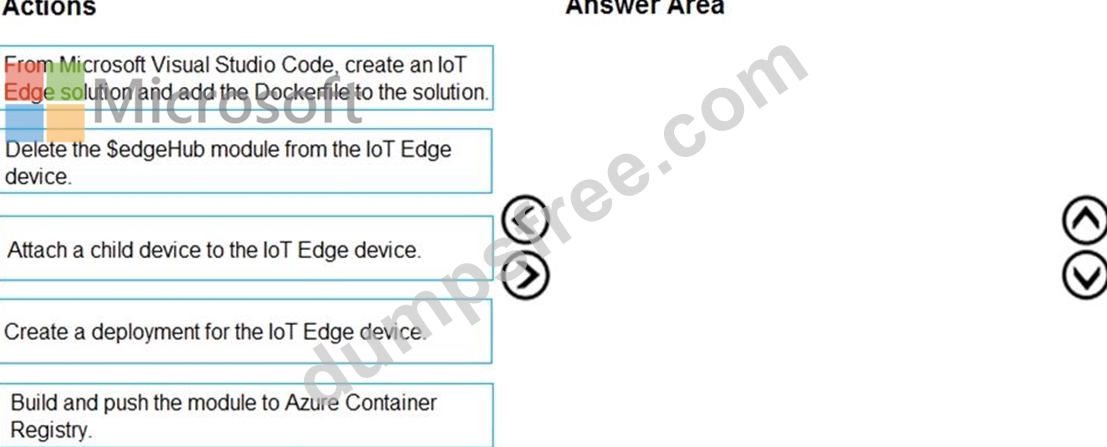
Answer:
Explanation: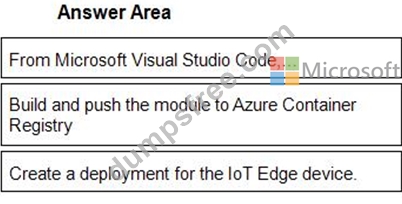
1 - From Microsoft Visual Studio Code,...
2 - Build and push the module to Azure Container Registry
3 - Create a deployment for the IoT Edge device.
Reference:
https://docs.microsoft.com/en-us/azure/iot-edge/tutorial-develop-for-linux?view=iotedge-2020-11
NEW QUESTION 56
You have an Azure IoT solution that includes an Azure IoT Hub named Hub1 and an Azure IoT Edge device named Edge1. Edge1 connects to Hub1.
You need to deploy a temperature module to Edge1. What should you do?
- A. Create an IoT Edge deployment manifest that specifies the temperature module and the route to
$upstream. From a Bush prompt, run the following command:
az iot hub monitor-events-device-id Edge1 -hub-name Hub1 - B. From the Azure portal, navigate to Hub1 and select IoT Edge. Select Edge1, and then select Manage Child Devices. From a Bash prompt, run the following command:
az iot edge set-modules -device-id Edge1 -hub-name Hub1 -content C:
\deploymentMan1.json - C. Create an IoT Edge deployment manifest that specifies the temperature module and the route to $upstream.
From a Bush prompt, run the following command:
az iot edge set-modules -device-id Edge1 -hub-name Hub1 -content C:\deploymentMan1.json - D. From the Azure portal, navigate to Hub1 and select IoT Edge. Select Edge1, select Device Twin, and then set the deployment manifest as a desired property. From a Bash prompt, run the following command az iot hub monitor-events-device-id Edge1 -hub-name Hub1
Answer: C
Explanation:
You deploy modules to your device by applying the deployment manifest that you configured with the module information.
Change directories into the folder where your deployment manifest is saved. If you used one of the VS Code IoT Edge templates, use the deployment.json file in the config folder of your solution directory and not the deployment.template.json file.
Use the following command to apply the configuration to an IoT Edge device:
az iot edge set-modules --device-id [device id] --hub-name [hub name] --content [file path]
Reference:
https://docs.microsoft.com/en-us/azure/iot-edge/how-to-deploy-modules-cli
NEW QUESTION 57
You have an Azure IoT solution that includes an Azure IoT hub, a Device Provisioning Service instance, and 1,000 connected IoT devices. The IoT devices are allocated to tour enrollment groups. Each enrollment group is configured to use certificate attestation.
You need to decommission all the devices in a single enrollment group and the enrollment group itself.
Which three actions should you perform in sequence? To answer, move the appropriate actions from the list of actions to the answer area and arrange them in the correct order.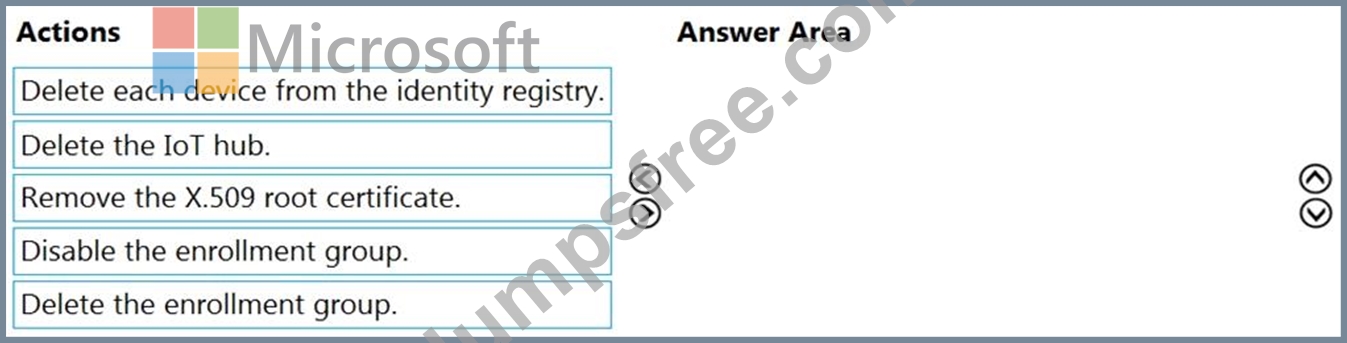
Answer:
Explanation: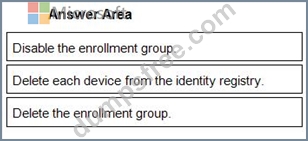
1 - Disable the enrollment group.
2 - Delete each device from the identity registry.
3 - Delete the enrollment group.
Reference:
https://docs.microsoft.com/en-us/azure/iot-dps/how-to-unprovision-devices
NEW QUESTION 58
You have an Azure IoT Edge solution.
You plan to deploy an Azure Security Center for IoT security agent. You need to configure the security agent to meet the following requirements:
Connection events must be reported as high priority.
High priority events must be collected every seven minutes.
How should you configure the azureiotsecurity module twin? To answer, drag the appropriate values to the correct locations. Each value may be used once, more than once, or not at all. You may need to drag the split bar between panes or scroll to view content.
NOTE: Each correct selection is worth one point.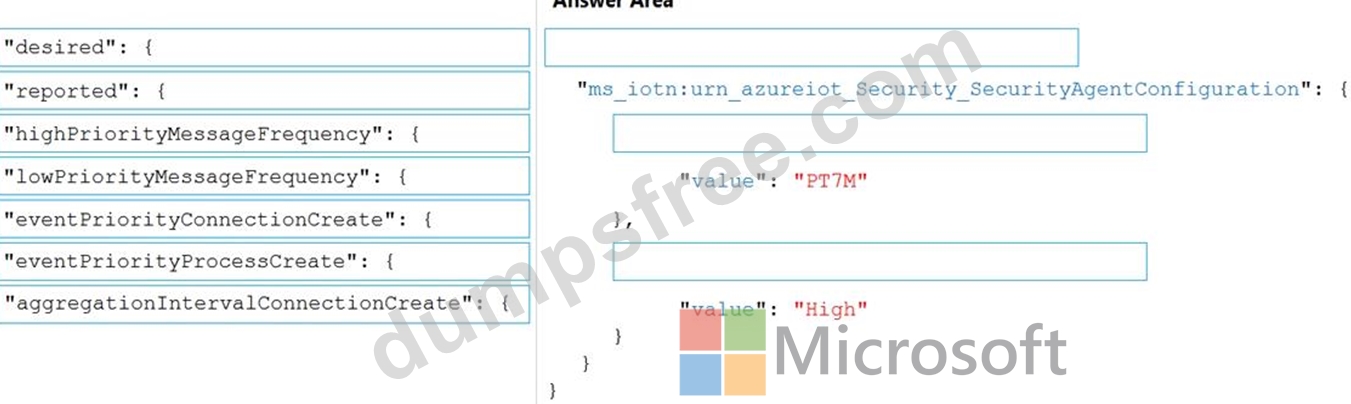
Answer:
Explanation: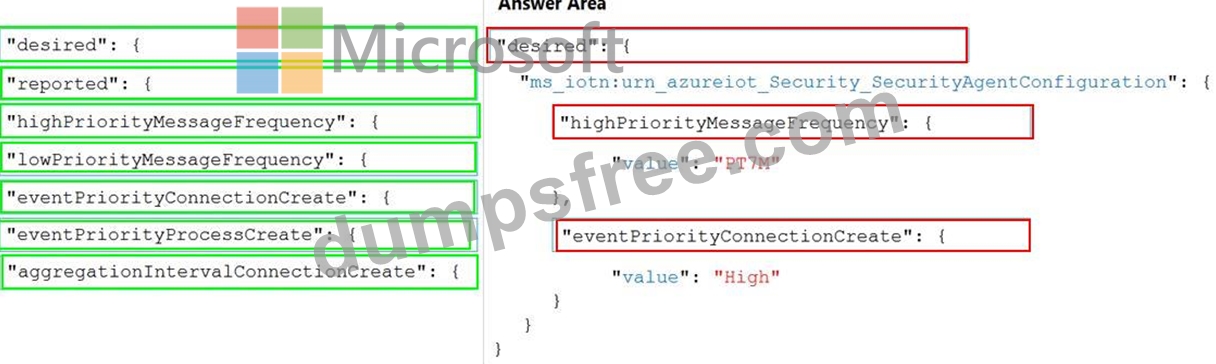
NEW QUESTION 59
You develop a custom Azure IoT Edge module named temperature-module.
You publish temperature-module to a private container registry named mycr.azurecr.io You need to build a deployment manifest for the IoT Edge device that will run temperature-module.
Which three container images should you define in the manifest? Each correct answer presents part of the solution.
NOTE: Each correct selection is worth one point.
- A. mcr.microsoft.com/iotedgedev:2.0
- B. mycr.azurecr.io/temperature-module:latest
- C. mcr.microsoft.com/azureiotedge-simulated-temperature-sensor:1.0
- D. mcr.microsoft.com/azureiotedge-agent:1.0
- E. mcr.microsoft.com/azureiotedge-hub:1.0
Answer: B,D,E
Explanation:
Each IoT Edge device runs at least two modules: $edgeAgent and $edgeHub, which are part of the IoT Edge runtime. IoT Edge device can run multiple additional modules for any number of processes. Use a deployment manifest to tell your device which modules to install and how to configure them to work together.
Reference:
https://docs.microsoft.com/en-us/azure/iot-edge/module-composition
NEW QUESTION 60
You have an Azure IoT hub.
You plan to attach three types of IoT devices as shown in the following table.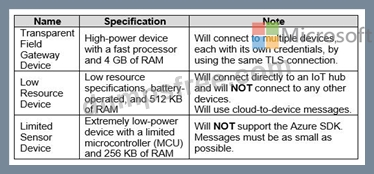
You need to select the appropriate communication protocol for each device.
What should you select? To answer, drag the appropriate protocols to the correct devices. Each protocol may be used once, more than once, or not at all. You may need to drag the split bar between panes or scroll to view content.
NOTE: Each correct selection is worth one point.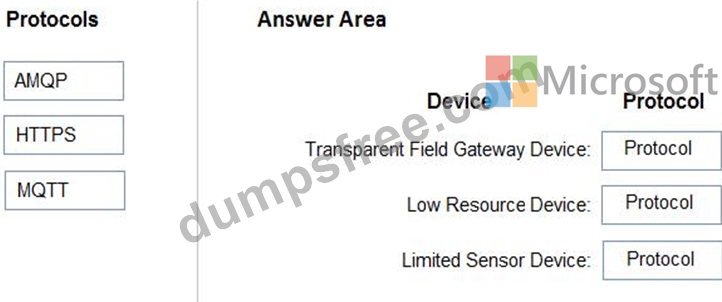
Answer:
Explanation: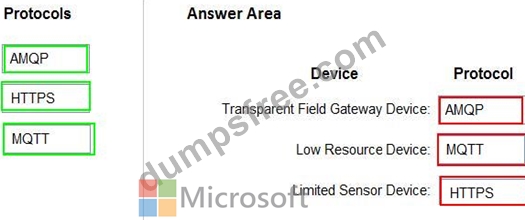
Reference:
https://docs.microsoft.com/en-us/azure/iot-hub/iot-hub-devguide-protocols
NEW QUESTION 61
You are planning a proof of concept (POC) that will use an Azure IoT hub.
You have two self-signed client authentication certificates named Cert1 and Cert2. Cert1 has a basic constraint that contains Subject Type=C You need to identify which certificates to use.
What should you identify? To answer, select the appropriate options in the answer area.
NOTE: Each correct selection is worth one point.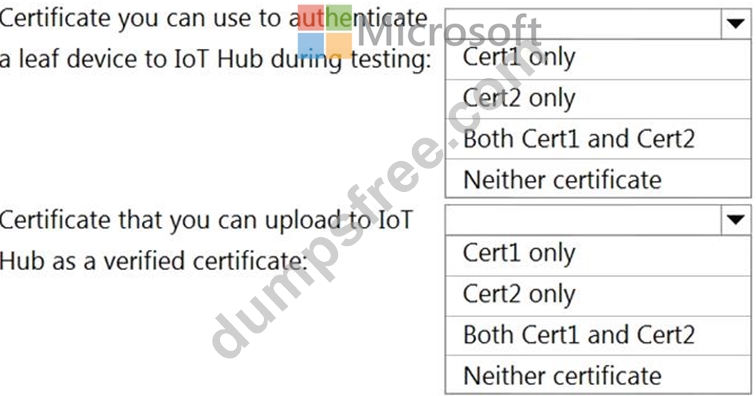
Answer:
Explanation: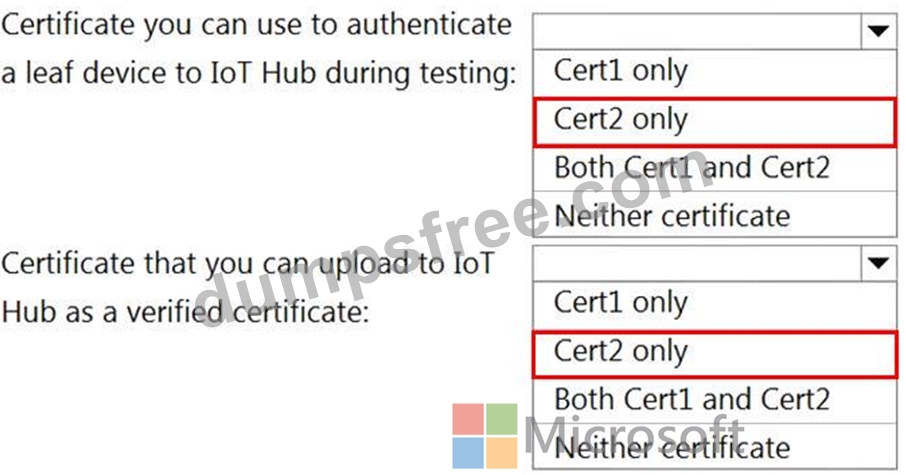
Reference:
https://docs.microsoft.com/en-us/azure/iot-dps/concepts-x509-attestation
NEW QUESTION 62
You have an Azure IoT hub that has a hostname of contoso-hub.azure-devices.net and an MCU-based IoT device named Device1. Device1 does NOT support Azure IoT SDKs.
You plan to connect Device1 to the IoT hub by using the Message Queuing Telemetry Transport (MQTT) protocol and to authenticate by using X.509 certificates.
You need to ensure that Device1 can authenticate to the IoT hub.
What should you do?
- A. From the Azure portal, create an IoT Hub Device Provisioning Service (DPS) instance and add a certificate enrollment for Device1.
- B. Enable a hardware security module (HSM) on Device1.
- C. Create an Azure key vault and enable the encryption of data at rest for the IoT hub by using a customermanaged key.
- D. Add the DigiCert Baltimore Root Certificate to Device1.
Answer: D
Explanation:
Explanation
Box 1: "desired": {
To configure connection events as high priority and collect high priority events every 7 minutes, use the following configuration.
"desired": {
"ms_iotn:urn_azureiot_Security_SecurityAgentConfiguration": {
"highPriorityMessageFrequency": {
"value": "PT7M"
},
"eventPriorityConnectionCreate": {
"value": "High"
}
Box 2: "highPriorityMessageFrequency ": {
Box 3: "eventPriorityConnectionCreate": {
Reference:
https://docs.microsoft.com/en-us/azure/defender-for-iot/how-to-agent-configuration
NEW QUESTION 63
You have an Azure IoT Edge module named SampleModule that runs on a device named Device1.
You make changes to the code of SampleModule by using Microsoft Visual Studio Code.
You need to push the code to the container registry and then deploy the module to Device1.
Which two actions should you perform from Visual Studio Code? Each correct answer presents part of the solution.
NOTE: Each correct selection is worth one point.
- A. Create a deployment for a single device.
- B. Upload to Azure Storage.
- C. Build and push the SampleModule code to the registry.
- D. Generate a shared access signature (SAS) token for Device 1.
- E. Build an loT Edge solution.
Answer: A,E
Explanation:
Explanation
D: Once you create IoT Edge modules with your business logic, you want to deploy them to your devices to operate at the edge.
B: Configure a deployment manifest. A deployment manifest is a JSON document that describes which modules to deploy, how data flows between the modules, and desired properties of the module twins.
You deploy modules to your device by applying the deployment manifest that you configured with the module information.
* In the Visual Studio Code explorer view, expand the Azure IoT Hub section, and then expand the Devices node.
* To confirm that the device you've chosen is an IoT Edge device, select it to expand the list of modules and verify the presence of $edgeHub and $edgeAgent. Every IoT Edge device includes these two modules.
* Select Create Deployment for Single Device.
* Navigate to the deployment manifest JSON file that you want to use, and click Select Edge Deployment Manifest.
Reference:
https://docs.microsoft.com/en-us/azure/iot-edge/how-to-deploy-modules-vscode
NEW QUESTION 64
You have an Azure IoT solution that includes a standard tier Azure IoT hub and an IoT device.
The device sends one 100-KB device-to-cloud message every hour.
You need to calculate the total daily message consumption of the device. What is the total daily message consumption of the device?
- A. 2,400
- B. 0
- C. 4,800
- D. 1
Answer: D
Explanation:
Explanation
100 KB * 24 is around 2,400 bytes.
The 100 KB message is divided into 4 KB blocks, and it is billed for 25 messages. 25 times 24 is 600 Note: The maximum message size for messages sent from a device to the cloud is 256 KB. These messages are metered in 4 KB blocks for the paid tiers so for instance if the device sends a 16 KB message via the paid tiers it will be billed as 4 messages.
Reference:
https://azure.microsoft.com/en-us/pricing/details/iot-hub/
NEW QUESTION 65
You have an Azure subscription that contains a resource group named RG1.
You need to deploy the Device Provisioning Service. The solution must ensure that the Device Provisioning Service can accept new device enrollments.
You create a Device Provisioning Service instance.
Which two actions should you perform next? Each correct answer presents part of the solution.
NOTE: Each correct selection is worth one point.
- A. From the Azure portal, create a new Azure IoT hub.
- B. From the Linked IoT hubs blade of the Device Provisioning Service, link an Azure IoT hub.
- C. From the Certificates blade of the Device Provisioning Service, upload an X.509 certificate to the Device Provisioning Service.
- D. From the Manage allocation policy blade of the Device Provisioning Service, configure an allocation policy.
Answer: C
Explanation:
A: The Device Provisioning Service can only provision devices to IoT hubs that have been linked to it.
C: Allocation policy. The service-level setting that determines how Device Provisioning Service assigns devices to an IoT hub. There are three supported allocation policies:
Lowest latency: devices are provisioned to an IoT hub with the lowest latency to the device. Evenly weighted distribution Static configuration via the enrollment list Reference:
https://docs.microsoft.com/bs-latn-ba/azure/iot-dps/concepts-service
NEW QUESTION 66
You have an Azure subscription that contains an Azure IoT hub, an Azure IoT Edge gateway, and 1,000 leaf devices. The leaf devices use a custom communication protocol that is NOT supported by the IoT hub.
You need to configure the gateway to meet the following requirements:
* Minimize the number of connections between the gateway and the IoT hub.
* Support addressing cloud-to-device messages to individual leaf devices.
How should you configure the gateway? To answer, select the appropriate options in the answer area.
NOTE: Each correct selection is worth one point.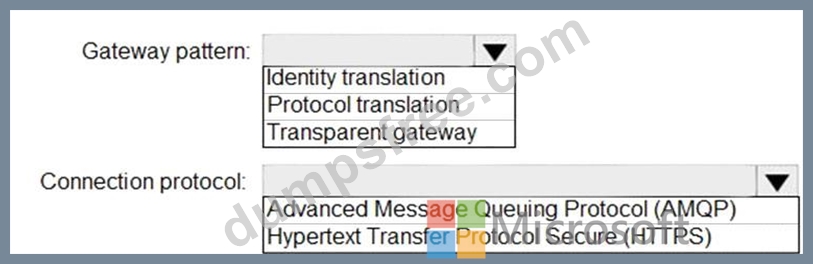
Answer:
Explanation: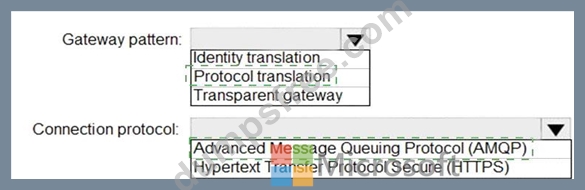
Explanation
Graphical user interface, text, application, table Description automatically generated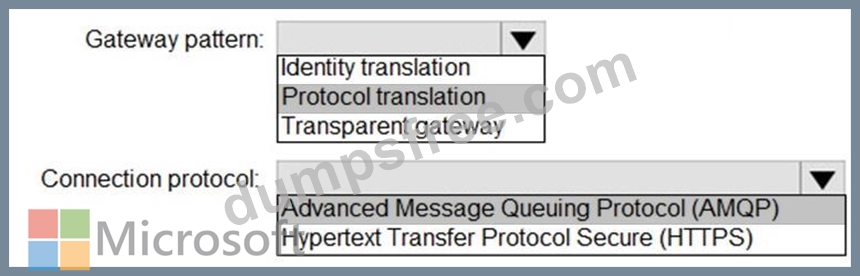
Box 1: Protocol translation
In the protocol translation gateway pattern, only the IoT Edge gateway has an identity with IoT Hub. The translation module receives messages from downstream devices, translates them into a supported protocol, and then the IoT Edge device sends the messages on behalf of the downstream devices.
Box 2: Advanced MessageQueuing Protocol (AMQP)
Connection multiplexing - All devices connecting to IoT Hub through an IoT Edge gateway can use the same underlying connection. This multiplexing capability requires that the IoT Edge gateway uses AMQP as its upstream protocol.
Reference:
https://docs.microsoft.com/en-us/azure/iot-edge/iot-edge-as-gateway
NEW QUESTION 67
You have an Azure subscription that contains an Azure IoT hub and 100 IoT devices.
The devices connect to the IoT hub by using the Advanced Message Queuing Protocol (AMQP) protocol and authenticate to the IoT hub by using symmetric keys.
You need to configure the SASL PLAIN username for the AMQP connection.
How should you configure the username? To answer, drag the appropriate options to the correct targets. Each option may be used once, more than once, or not at all. You may need to drag the split bar between panes or scroll to view content.
NOTE: Each correct selection is worth one point.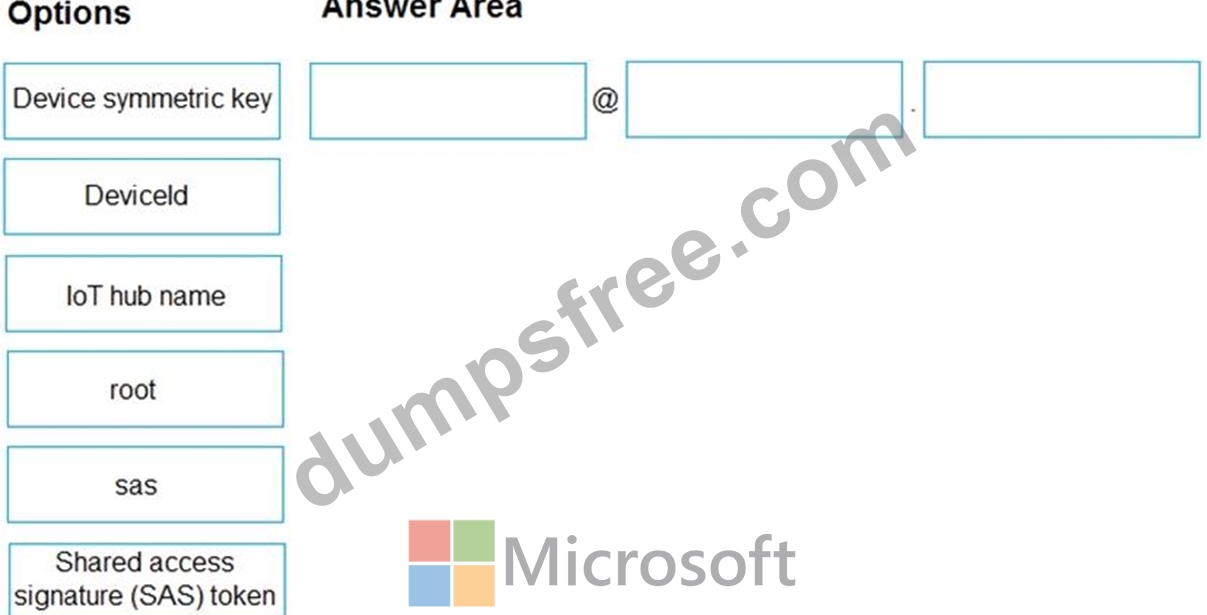
Answer:
Explanation: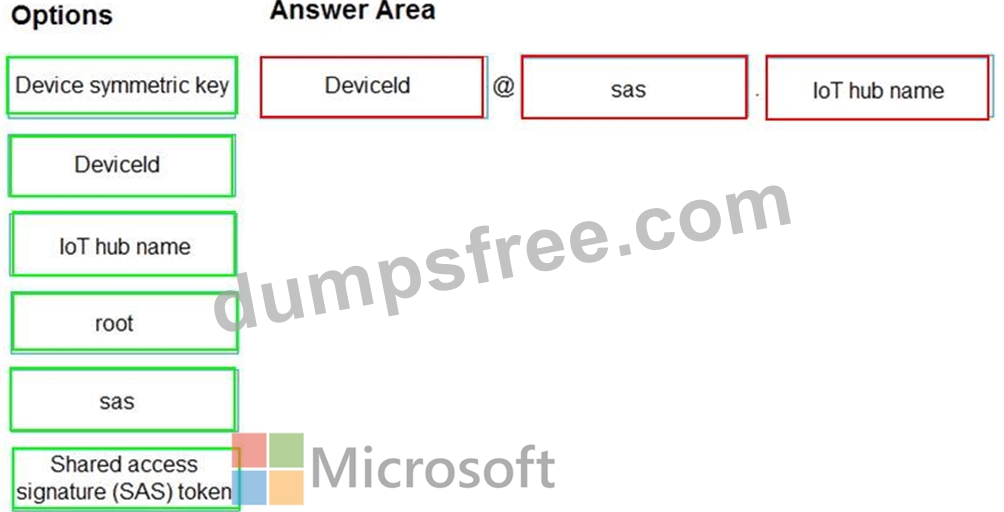
Reference:
https://docs.microsoft.com/en-us/azure/iot-hub/iot-hub-dev-guide-sas
NEW QUESTION 68
You have an Azure IoT Edge module named SampleModule that runs on a device named Device1.
You make changes to the code of SampleModule by using Microsoft Visual Studio Code.
You need to push the code to the container registry and then deploy the module to Device1.
Which two actions should you perform from Visual Studio Code? Each correct answer presents part of the solution.
NOTE: Each correct selection is worth one point.
- A. Generate a deployment manifest.
- B. Create a deployment for a single device.
- C. Build and push the SampleModule code to the registry.
- D. Generate a shared access signature (SAS) token for Device 1.
- E. Build an loT Edge solution.
Answer: A,B
Explanation:
C: Configure a deployment manifest. A deployment manifest is a JSON document that describes which modules to deploy, how data flows between the modules, and desired properties of the module twins.
B: You deploy modules to your device by applying the deployment manifest that you configured with the module information.
Reference:
https://docs.microsoft.com/en-us/azure/iot-edge/how-to-deploy-modules-vscode
NEW QUESTION 69
You have an Azure IoT Central application.
You need to connect an IoT device to the application.
Which two settings do you require in IoT Central to configure the device? Each correct answer presents part of the solution.
NOTE: Each correct selection is worth one point.
- A. Scope ID
- B. Device ID
- C. Group SAS Primary Key
- D. the IoT hub name
- E. Application Name
Answer: A,B
Explanation:
Explanation
In your Azure IoT Central application, add a real device to the device template
1. On the Devices page, select the Environmental sensor device template.
2. Select + New.
3. Make sure that Simulated is Off. Then select Create.
Click on the device name, and then select Connect. Make a note of the device connection information on the Device Connection page - ID scope, Device ID, and Primary key. You need these values when you create your device code: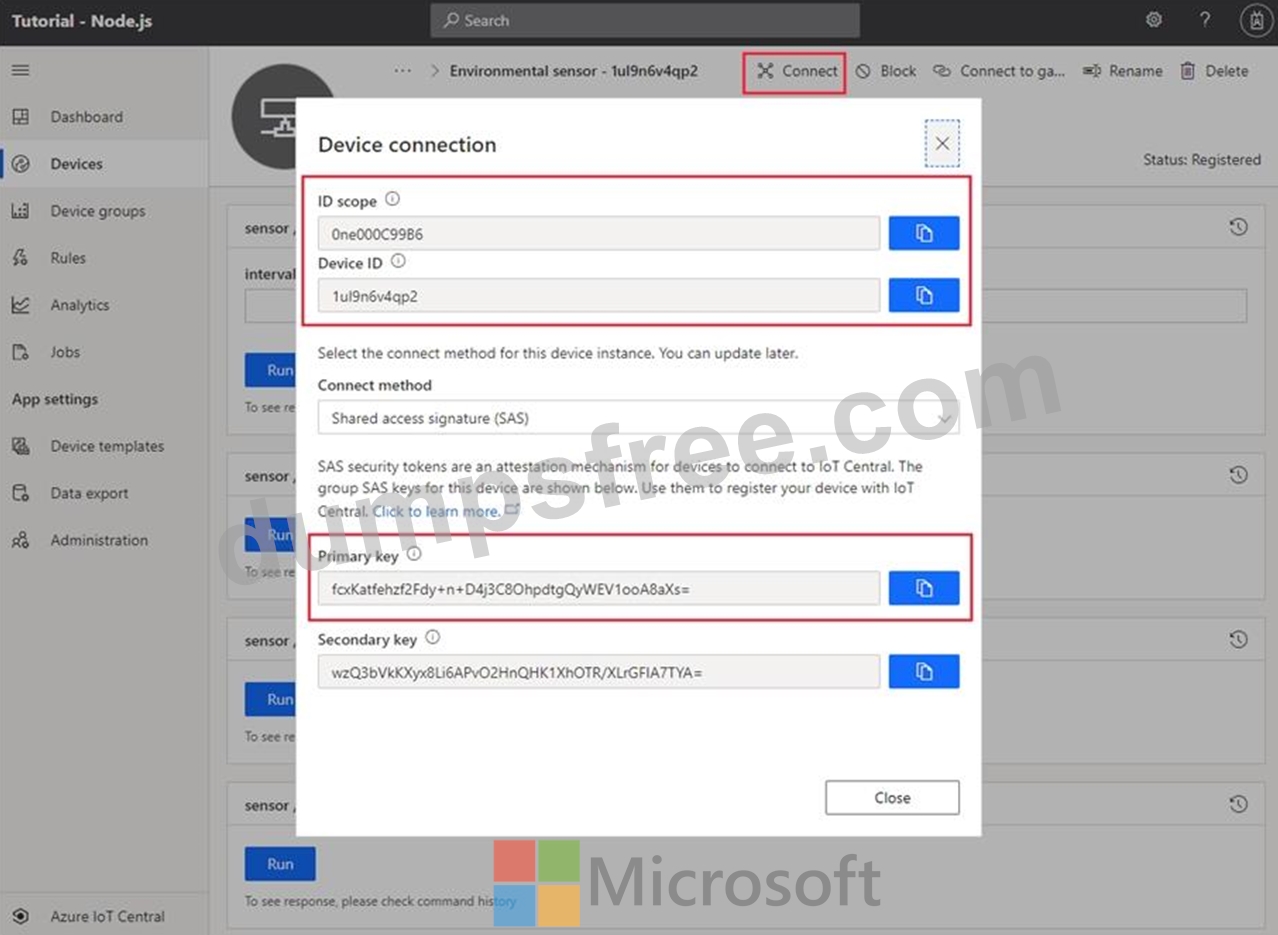
Reference:
https://docs.microsoft.com/bs-cyrl-ba/azure/iot-central/core/tutorial-connect-device-python
NEW QUESTION 70
You have an Azure IoT Central application.
You need to connect an IoT device to the application.
Which two settings do you require in IoT Central to configure the device? Each correct answer presents part of the solution.
NOTE: Each correct selection is worth one point.
- A. Scope ID
- B. Device ID
- C. Group SAS Primary Key
- D. the IoT hub name
- E. Application Name
Answer: A,B
Explanation:
In your Azure IoT Central application, add a real device to the device template
1. On the Devices page, select the Environmental sensor device template.
2. Select + New.
3. Make sure that Simulated is Off. Then select Create.
Click on the device name, and then select Connect. Make a note of the device connection information on the Device Connection page - ID scope, Device ID, and Primary key. You need these values when you create your device code: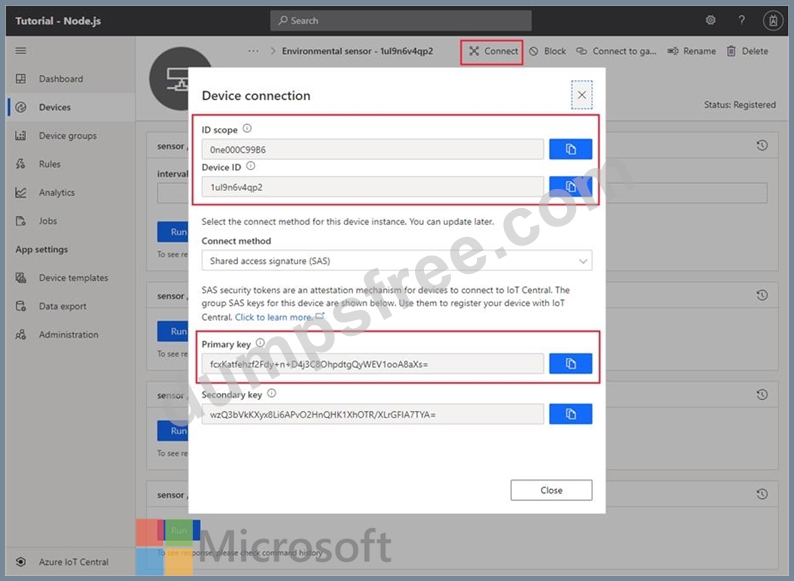
Reference:
https://docs.microsoft.com/bs-cyrl-ba/azure/iot-central/core/tutorial-connect-device-python
NEW QUESTION 71
You need to use message enrichment to add additional device information to messages sent from the IoT gateway devices when the reported temperature exceeds a critical threshold.
How should you configure the enrich message values? To answer, select the appropriate options in the answer area.
NOTE: Each correct selection is worth one point.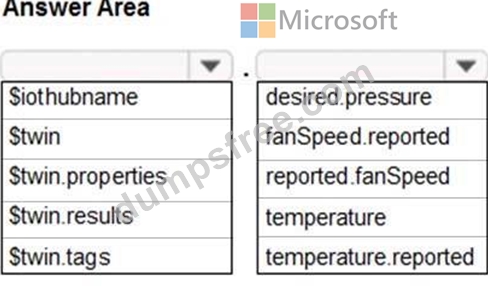
Answer:
Explanation: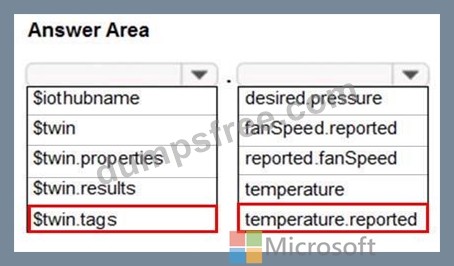
Reference:
https://docs.microsoft.com/bs-cyrl-ba/azure/iot-hub/iot-hub-message-enrichments-overview
NEW QUESTION 72
You are configuring a production environment for an Azure IoT solution.
You plan to deploy 1,000 IoT devices. Each device will send one device-to-cloud message every hour. Each message will be 4 KB.
You need to deploy an Azure IoT hub that will support the IoT device deployment. The solution must meet the following requirements:
Perform bulk device operations such as creating multiple device identities.
Minimize costs
What should you deploy?
- A. one unit of the S1 tier
- B. one unit of the B1 tier
- C. one unit of the free tier
- D. one unit of the S2 tier
Answer: C
Explanation:
Reference:
https://docs.microsoft.com/en-us/azure/iot-hub/iot-hub-devguide-quotas-throttling
NEW QUESTION 73
You have an Azure IoT Central application that has a custom device template.
You need to configure the device template to support the following activities:
Return the reported power consumption.
Configure the desired fan speed.
Run the device reset routine.
Read the fan serial number.
Which option should you use for each activity? Each correct answer presents part of the solution.
NOTE: Each correct selection is worth one point.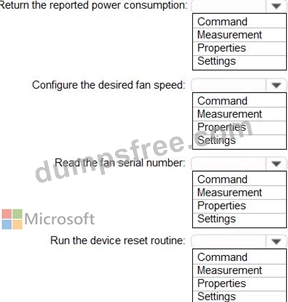
Answer:
Explanation: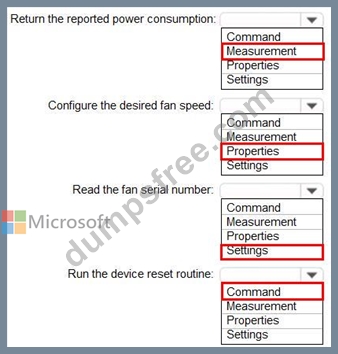
Reference:
https://docs.microsoft.com/en-us/azure/iot-central/core/howto-set-up-template
NEW QUESTION 74
You have an existing Azure IoT hub.
You use IoT Hub jobs to schedule long running tasks on connected devices.
Which three operations do the IoT Hub jobs support directly? Each correct answer presents a complete solution.
NOTE: Each correct selection is worth one point.
- A. Disable IoT device registry entries.
- B. Invoke direct methods.
- C. Update desired properties.
- D. Send cloud-to-device messages.
- E. Update tags.
- F. Trigger Azure functions.
Answer: B,C,E
Explanation:
Explanation
Consider using jobs when you need to schedule and track progress any of the following activities on a set of devices:
* Invoke direct methods
* Update desired properties
* Update tags
Reference:
https://docs.microsoft.com/en-us/azure/iot-hub/iot-hub-devguide-jobs
NEW QUESTION 75
You need to install the Azure IoT Edge runtime on a new device that runs Windows 10 IoT Enterprise.
Which four actions should you perform in sequence? To answer, move the appropriate actions from the list of actions to the answer area and arrange them in the correct order.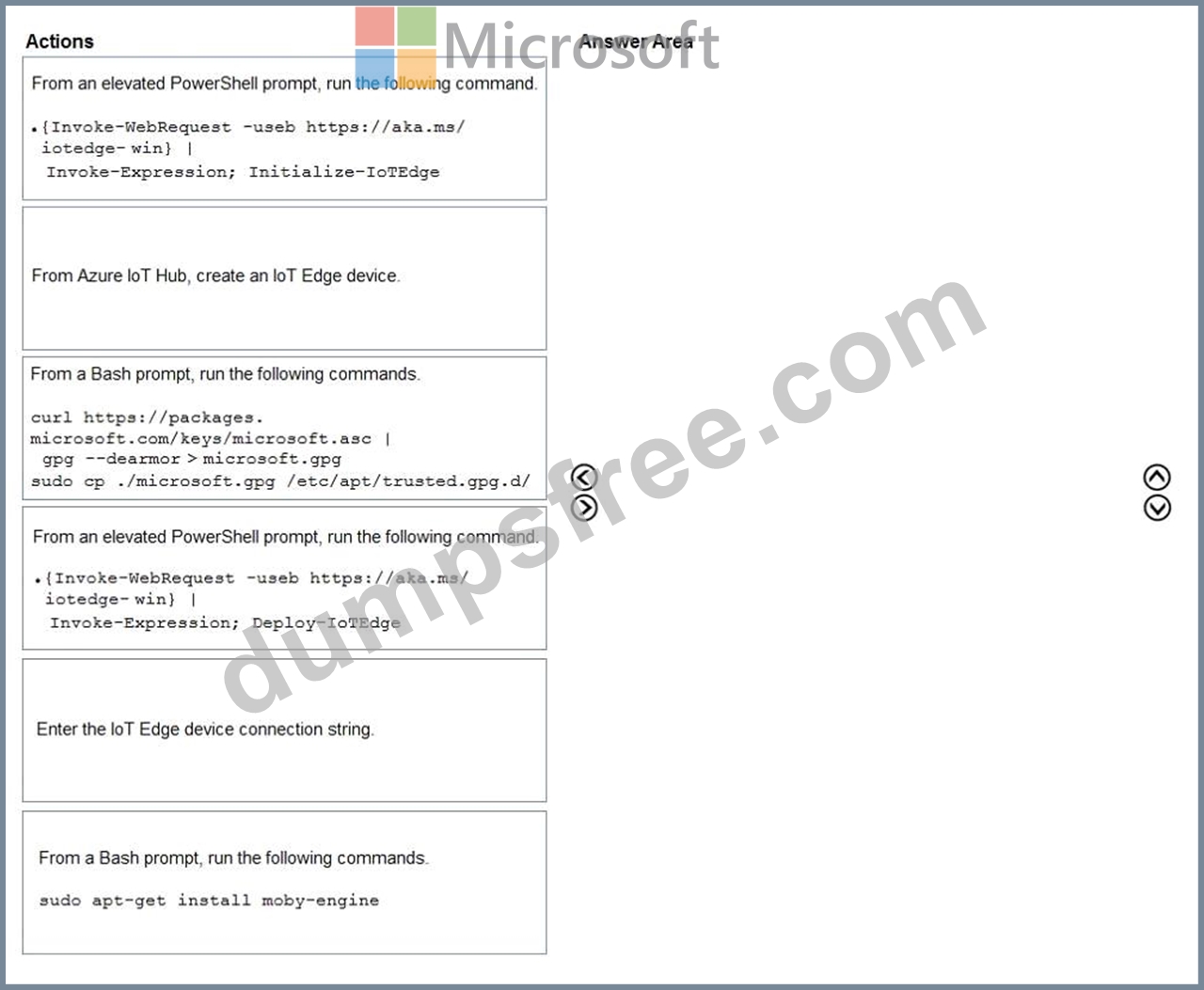
Answer:
Explanation: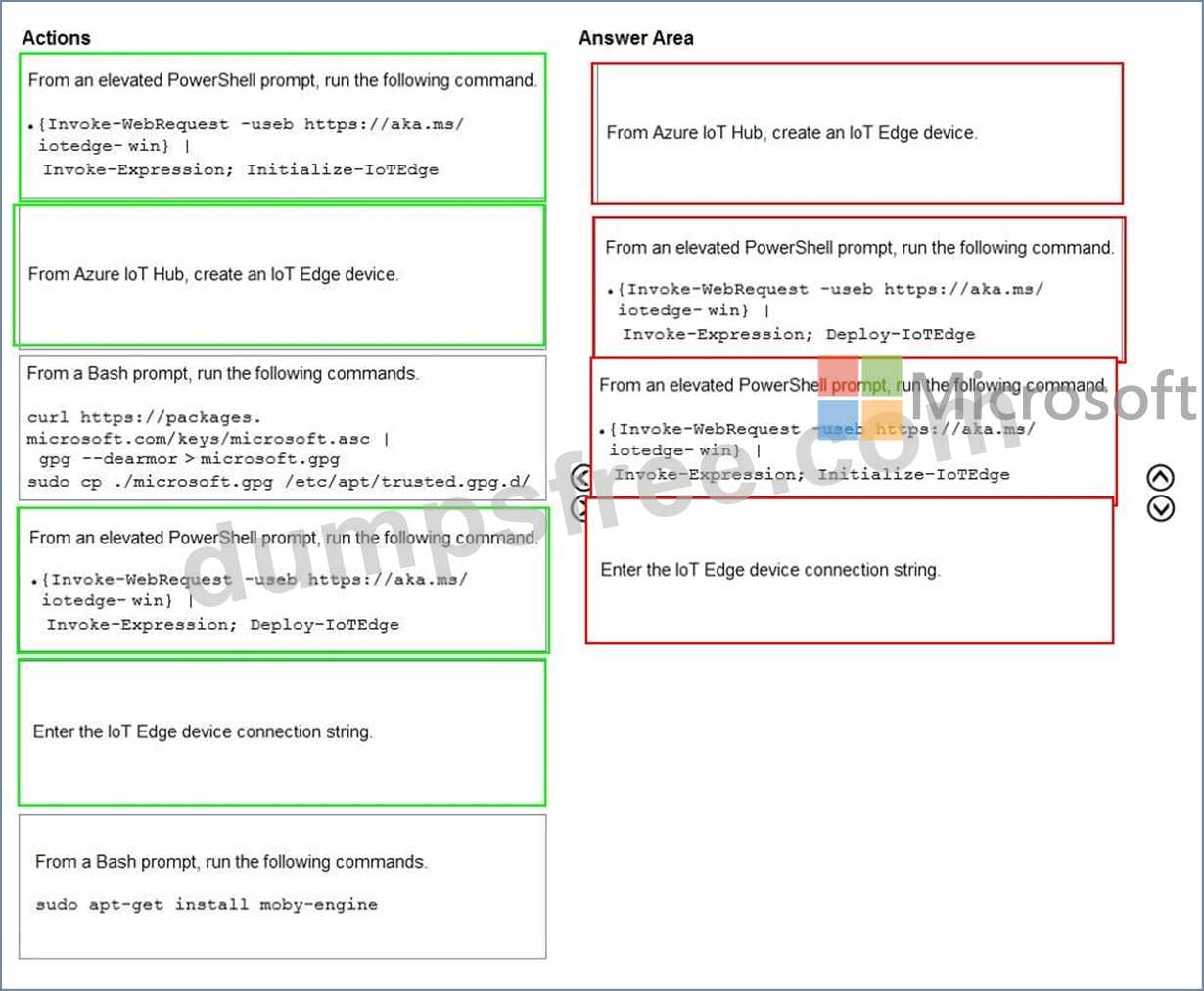
Explanation:
Step 1: From Azure IoT Hub, create an IoT Edge Device
Step 2: Deploy-IoTEdge
The Deploy-IoTEdge command checks that your Windows machine is on a supported version, turns on the containers feature, and then downloads the moby runtime and the IoT Edge runtime. The command defaults to using Windows containers.
{Invoke-WebRequest -useb https://aka.ms/iotedge-win} | Invoke-Expression; ` Deploy-IoTEdge Step 3: Initialize-IoTEdge The Initialize-IoTEdge command configures the IoT Edge runtime on your machine. The command defaults to manual provisioning with Windows containers.
{Invoke-WebRequest -useb https://aka.ms/iotedge
Step 4: Enter the IoT Edge device connection string.
When prompted, provide the device connection string that you retrieved in step 1. The device connection string associates the physical device with a device ID in IoT Hub.
Reference:
https://docs.microsoft.com/en-us/azure/iot-edge/module-composition
NEW QUESTION 76
......
Online Questions - Valid Practice AZ-220 Exam Dumps Test Questions: https://www.dumpsfree.com/AZ-220-valid-exam.html
100% Real AZ-220 dumps - Brilliant AZ-220 Exam Questions PDF: https://drive.google.com/open?id=1qn5jTn7og6mR7J19Nd9reIlNoDwhv9Xt