


CKS Braindumps Real Exam Updated on Dec 26, 2023 with 49 Questions
Latest CKS PDF Dumps & Real Tests Free Updated Today
The CKS exam is designed to test the security skills of individuals who work with Kubernetes clusters, including system administrators, developers, and security professionals. CKS exam is intended to validate an individual's ability to secure Kubernetes clusters and the applications that run on them, as well as their understanding of best practices for securing Kubernetes environments.
The CKS certification exam is designed for individuals who have a deep understanding of Kubernetes security and are experienced in implementing security best practices in a Kubernetes environment. CKS exam covers a wide range of topics, including cluster setup, securing the Kubernetes API, network policies, securing Kubernetes workloads, and monitoring and logging. Candidates must be familiar with various Kubernetes security tools and be able to troubleshoot common security issues.
NEW QUESTION # 18
You can switch the cluster/configuration context using the following command: [desk@cli] $ kubectl config use-context test-account Task: Enable audit logs in the cluster.
To do so, enable the log backend, and ensure that:
1. logs are stored at /var/log/Kubernetes/logs.txt
2. log files are retained for 5 days
3. at maximum, a number of 10 old audit log files are retained
A basic policy is provided at /etc/Kubernetes/logpolicy/audit-policy.yaml. It only specifies what not to log. Note: The base policy is located on the cluster's master node.
Edit and extend the basic policy to log: 1. Nodes changes at RequestResponse level 2. The request body of persistentvolumes changes in the namespace frontend 3. ConfigMap and Secret changes in all namespaces at the Metadata level Also, add a catch-all rule to log all other requests at the Metadata level Note: Don't forget to apply the modified policy.
Answer:
Explanation:
$ vim /etc/kubernetes/log-policy/audit-policy.yaml
- level: RequestResponse
userGroups: ["system:nodes"]
- level: Request
resources:
- group: "" # core API group
resources: ["persistentvolumes"]
namespaces: ["frontend"]
- level: Metadata
resources:
- group: ""
resources: ["configmaps", "secrets"]
- level: Metadata
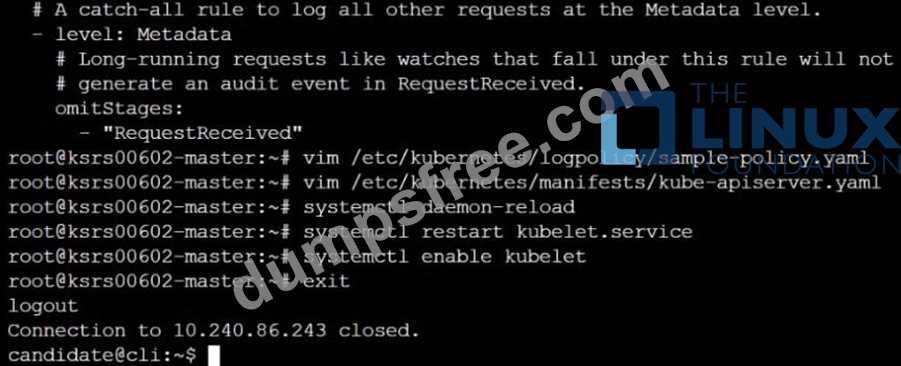
$ vim /etc/kubernetes/manifests/kube-apiserver.yaml Add these
- --audit-policy-file=/etc/kubernetes/log-policy/audit-policy.yaml
- --audit-log-path=/var/log/kubernetes/logs.txt
- --audit-log-maxage=5
- --audit-log-maxbackup=10
Explanation
[desk@cli] $ ssh master1 [master1@cli] $ vim /etc/kubernetes/log-policy/audit-policy.yaml apiVersion: audit.k8s.io/v1 # This is required.
kind: Policy
# Don't generate audit events for all requests in RequestReceived stage.
omitStages:
- "RequestReceived"
rules:
# Don't log watch requests by the "system:kube-proxy" on endpoints or services
- level: None
users: ["system:kube-proxy"]
verbs: ["watch"]
resources:
- group: "" # core API group
resources: ["endpoints", "services"]
# Don't log authenticated requests to certain non-resource URL paths.
- level: None
userGroups: ["system:authenticated"]
nonResourceURLs:
- "/api*" # Wildcard matching.
- "/version"
# Add your changes below
- level: RequestResponse
userGroups: ["system:nodes"] # Block for nodes
- level: Request
resources:
- group: "" # core API group
resources: ["persistentvolumes"] # Block for persistentvolumes
namespaces: ["frontend"] # Block for persistentvolumes of frontend ns
- level: Metadata
resources:
- group: "" # core API group
resources: ["configmaps", "secrets"] # Block for configmaps & secrets
- level: Metadata # Block for everything else
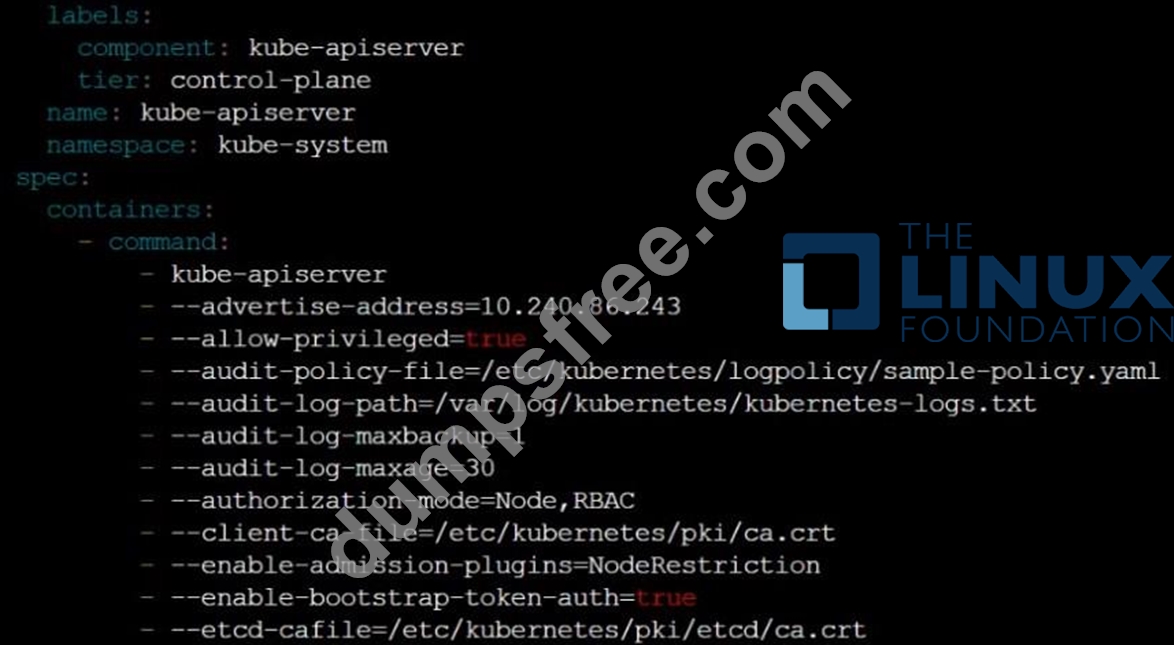
[master1@cli] $ vim /etc/kubernetes/manifests/kube-apiserver.yaml
apiVersion: v1
kind: Pod
metadata:
annotations:
kubeadm.kubernetes.io/kube-apiserver.advertise-address.endpoint: 10.0.0.5:6443 labels:
component: kube-apiserver
tier: control-plane
name: kube-apiserver
namespace: kube-system
spec:
containers:
- command:
- kube-apiserver
- --advertise-address=10.0.0.5
- --allow-privileged=true
- --authorization-mode=Node,RBAC
- --audit-policy-file=/etc/kubernetes/log-policy/audit-policy.yaml #Add this
- --audit-log-path=/var/log/kubernetes/logs.txt #Add this
- --audit-log-maxage=5 #Add this
- --audit-log-maxbackup=10 #Add this
...
output truncated
Note: log volume & policy volume is already mounted in vim /etc/kubernetes/manifests/kube-apiserver.yaml so no need to mount it. Reference: https://kubernetes.io/docs/tasks/debug-application-cluster/audit/
NEW QUESTION # 19
You can switch the cluster/configuration context using the following command: [desk@cli] $ kubectl config use-context stage Context: A PodSecurityPolicy shall prevent the creation of privileged Pods in a specific namespace. Task: 1. Create a new PodSecurityPolcy named deny-policy, which prevents the creation of privileged Pods. 2. Create a new ClusterRole name deny-access-role, which uses the newly created PodSecurityPolicy deny-policy. 3. Create a new ServiceAccount named psd-denial-sa in the existing namespace development. Finally, create a new ClusterRoleBindind named restrict-access-bind, which binds the newly created ClusterRole deny-access-role to the newly created ServiceAccount psp-denial-sa
Answer:
Explanation:
Create psp to disallow privileged container
apiVersion: rbac.authorization.k8s.io/v1
kind: ClusterRole
metadata:
name: deny-access-role
rules:
- apiGroups: ['policy']
resources: ['podsecuritypolicies']
verbs: ['use']
resourceNames:
- "deny-policy"
k create sa psp-denial-sa -n development
apiVersion: rbac.authorization.k8s.io/v1
kind: ClusterRoleBinding
metadata:
name: restrict-access-bing
roleRef:
kind: ClusterRole
name: deny-access-role
apiGroup: rbac.authorization.k8s.io
subjects:
- kind: ServiceAccount
name: psp-denial-sa
namespace: development
Explanation
master1 $ vim psp.yaml
apiVersion: policy/v1beta1
kind: PodSecurityPolicy
metadata:
name: deny-policy
spec:
privileged: false # Don't allow privileged pods!
seLinux:
rule: RunAsAny
supplementalGroups:
rule: RunAsAny
runAsUser:
rule: RunAsAny
fsGroup:
rule: RunAsAny
volumes:
- '*'
master1 $ vim cr1.yaml
apiVersion: rbac.authorization.k8s.io/v1
kind: ClusterRole
metadata:
name: deny-access-role
rules:
- apiGroups: ['policy']
resources: ['podsecuritypolicies']
verbs: ['use']
resourceNames:
- "deny-policy"
master1 $ k create sa psp-denial-sa -n development master1 $ vim cb1.yaml apiVersion: rbac.authorization.k8s.io/v1 kind: ClusterRoleBinding metadata:
name: restrict-access-bing
roleRef:
kind: ClusterRole
name: deny-access-role
apiGroup: rbac.authorization.k8s.io
subjects:
# Authorize specific service accounts:
- kind: ServiceAccount
name: psp-denial-sa
namespace: development
master1 $ k apply -f psp.yaml master1 $ k apply -f cr1.yaml master1 $ k apply -f cb1.yaml Reference: https://kubernetes.io/docs/concepts/policy/pod-security-policy/
NEW QUESTION # 20
SIMULATION
Create a RuntimeClass named gvisor-rc using the prepared runtime handler named runsc.
Create a Pods of image Nginx in the Namespace server to run on the gVisor runtime class
Answer:
Explanation:
Install the Runtime Class for gVisor
{ # Step 1: Install a RuntimeClass
cat <<EOF | kubectl apply -f -
apiVersion: node.k8s.io/v1beta1
kind: RuntimeClass
metadata:
name: gvisor
handler: runsc
EOF
}
Create a Pod with the gVisor Runtime Class
{ # Step 2: Create a pod
cat <<EOF | kubectl apply -f -
apiVersion: v1
kind: Pod
metadata:
name: nginx-gvisor
spec:
runtimeClassName: gvisor
containers:
- name: nginx
image: nginx
EOF
}
Verify that the Pod is running
{ # Step 3: Get the pod
kubectl get pod nginx-gvisor -o wide
}
NEW QUESTION # 21
You must complete this task on the following cluster/nodes: Cluster: immutable-cluster Master node: master1 Worker node: worker1 You can switch the cluster/configuration context using the following command: [desk@cli] $ kubectl config use-context immutable-cluster Context: It is best practice to design containers to be stateless and immutable. Task: Inspect Pods running in namespace prod and delete any Pod that is either not stateless or not immutable. Use the following strict interpretation of stateless and immutable: 1. Pods being able to store data inside containers must be treated as not stateless. Note: You don't have to worry whether data is actually stored inside containers or not already. 2. Pods being configured to be privileged in any way must be treated as potentially not stateless or not immutable.
Answer:
Explanation: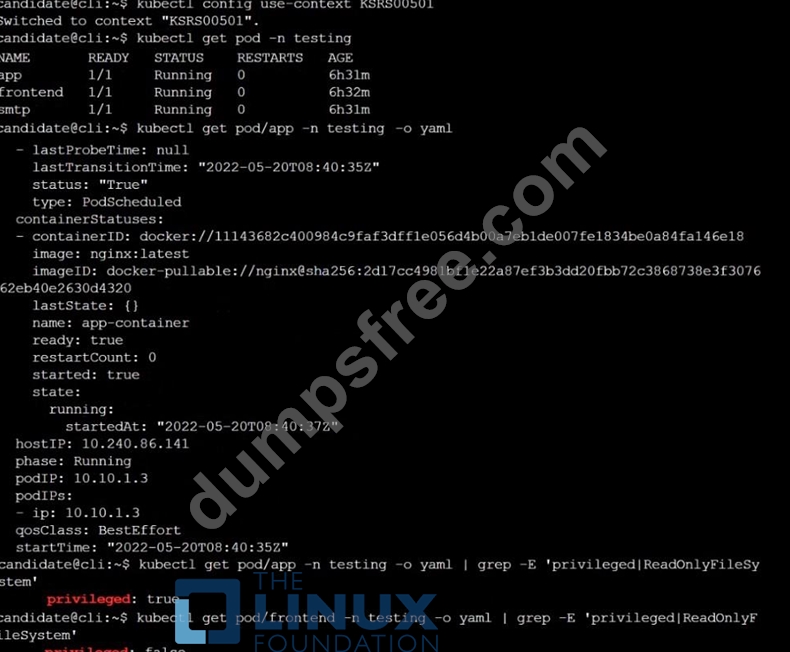
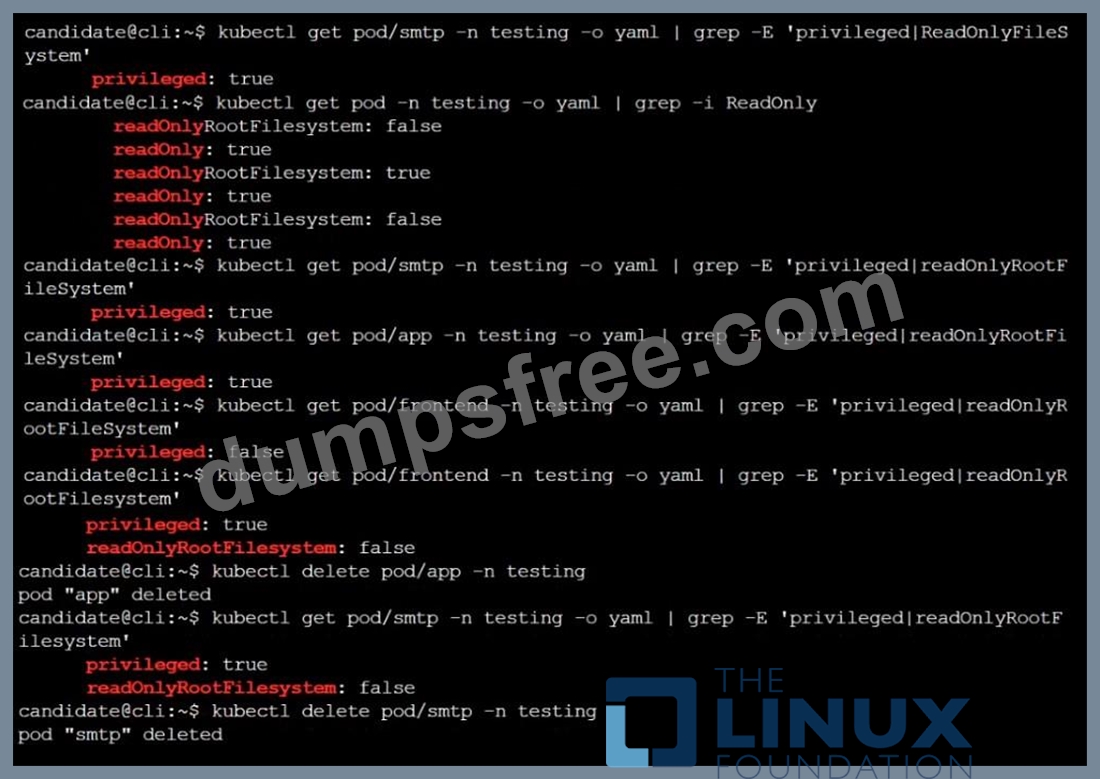
Reference: https://kubernetes.io/docs/concepts/policy/pod-security-policy/ https://cloud.google.com/architecture/best-practices-for-operating-containers
NEW QUESTION # 22
SIMULATION
Before Making any changes build the Dockerfile with tag base:v1
Now Analyze and edit the given Dockerfile(based on ubuntu 16:04)
Fixing two instructions present in the file, Check from Security Aspect and Reduce Size point of view.
Dockerfile:
FROM ubuntu:latest
RUN apt-get update -y
RUN apt install nginx -y
COPY entrypoint.sh /
RUN useradd ubuntu
ENTRYPOINT ["/entrypoint.sh"]
USER ubuntu
entrypoint.sh
#!/bin/bash
echo "Hello from CKS"
After fixing the Dockerfile, build the docker-image with the tag base:v2 To Verify: Check the size of the image before and after the build.
- A. Send us the Feedback on it.
Answer: A
NEW QUESTION # 23
Context:
Cluster: prod
Master node: master1
Worker node: worker1
You can switch the cluster/configuration context using the following command:
[desk@cli] $ kubectl config use-context prod
Task:
Analyse and edit the given Dockerfile (based on the ubuntu:18:04 image)
/home/cert_masters/Dockerfile fixing two instructions present in the file being prominent security/best-practice issues.
Analyse and edit the given manifest file
/home/cert_masters/mydeployment.yaml fixing two fields present in the file being prominent security/best-practice issues.
Note: Don't add or remove configuration settings; only modify the existing configuration settings, so that two configuration settings each are no longer security/best-practice concerns.
Should you need an unprivileged user for any of the tasks, use user nobody with user id 65535
Answer:
Explanation:
1. For Dockerfile: Fix the image version & user name in Dockerfile
2. For mydeployment.yaml : Fix security contexts
Explanation
[desk@cli] $ vim /home/cert_masters/Dockerfile
FROM ubuntu:latest # Remove this
FROM ubuntu:18.04 # Add this
USER root # Remove this
USER nobody # Add this
RUN apt get install -y lsof=4.72 wget=1.17.1 nginx=4.2
ENV ENVIRONMENT=testing
USER root # Remove this
USER nobody # Add this
CMD ["nginx -d"]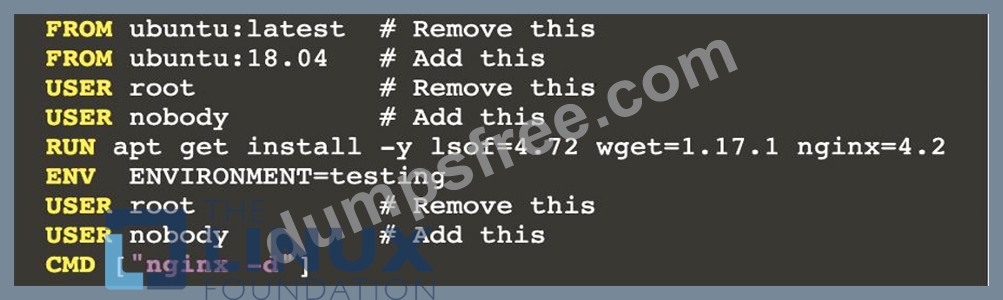
[desk@cli] $ vim /home/cert_masters/mydeployment.yaml
apiVersion: apps/v1
kind: Deployment
metadata:
creationTimestamp: null
labels:
app: kafka
name: kafka
spec:
replicas: 1
selector:
matchLabels:
app: kafka
strategy: {}
template:
metadata:
creationTimestamp: null
labels:
app: kafka
spec:
containers:
- image: bitnami/kafka
name: kafka
volumeMounts:
- name: kafka-vol
mountPath: /var/lib/kafka
securityContext:
{"capabilities":{"add":["NET_ADMIN"],"drop":["all"]},"privileged": True,"readOnlyRootFilesystem": False, "runAsUser": 65535} # Delete This
{"capabilities":{"add":["NET_ADMIN"],"drop":["all"]},"privileged": False,"readOnlyRootFilesystem": True, "runAsUser": 65535} # Add This resources: {} volumes:
- name: kafka-vol
emptyDir: {}
status: {}
Pictorial View:
[desk@cli] $ vim /home/cert_masters/mydeployment.yaml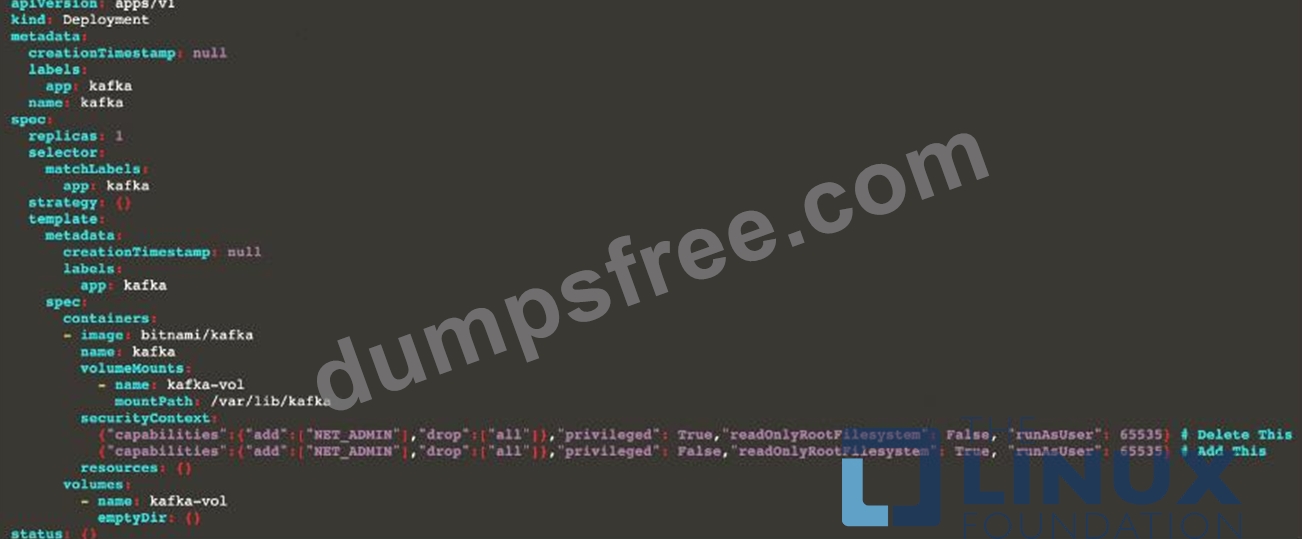
NEW QUESTION # 24
Create a new ServiceAccount named backend-sa in the existing namespace default, which has the capability to list the pods inside the namespace default.
Create a new Pod named backend-pod in the namespace default, mount the newly created sa backend-sa to the pod, and Verify that the pod is able to list pods.
Ensure that the Pod is running.
Answer:
Explanation:
A service account provides an identity for processes that run in a Pod.
When you (a human) access the cluster (for example, using kubectl), you are authenticated by the apiserver as a particular User Account (currently this is usually admin, unless your cluster administrator has customized your cluster). Processes in containers inside pods can also contact the apiserver. When they do, they are authenticated as a particular Service Account (for example, default).
When you create a pod, if you do not specify a service account, it is automatically assigned the default service account in the same namespace. If you get the raw json or yaml for a pod you have created (for example, kubectl get pods/<podname> -o yaml), you can see the spec.serviceAccountName field has been automatically set.
You can access the API from inside a pod using automatically mounted service account credentials, as described in Accessing the Cluster. The API permissions of the service account depend on the authorization plugin and policy in use.
In version 1.6+, you can opt out of automounting API credentials for a service account by setting automountServiceAccountToken: false on the service account:
apiVersion: v1
kind: ServiceAccount
metadata:
name: build-robot
automountServiceAccountToken: false
...
In version 1.6+, you can also opt out of automounting API credentials for a particular pod:
apiVersion: v1
kind: Pod
metadata:
name: my-pod
spec:
serviceAccountName: build-robot
automountServiceAccountToken: false
...
The pod spec takes precedence over the service account if both specify a automountServiceAccountToken value.
NEW QUESTION # 25
Cluster: scanner Master node: controlplane Worker node: worker1
You can switch the cluster/configuration context using the following command:
[desk@cli] $ kubectl config use-context scanner
Given: You may use Trivy's documentation.
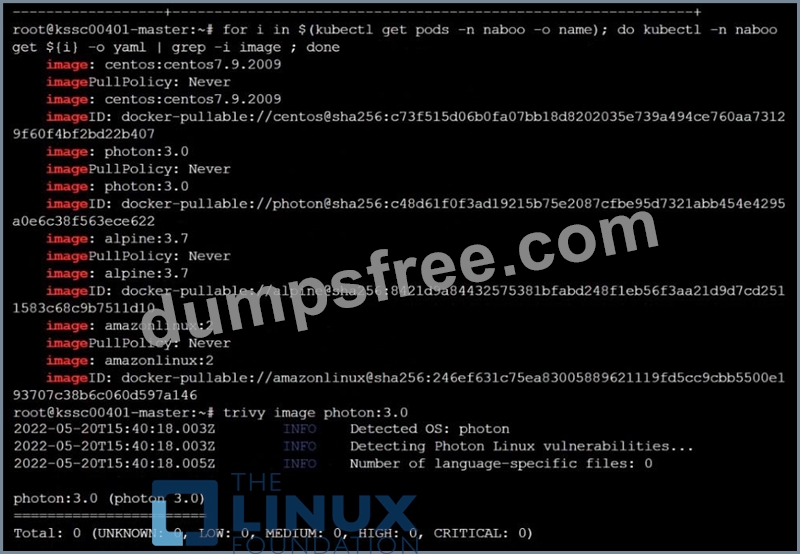
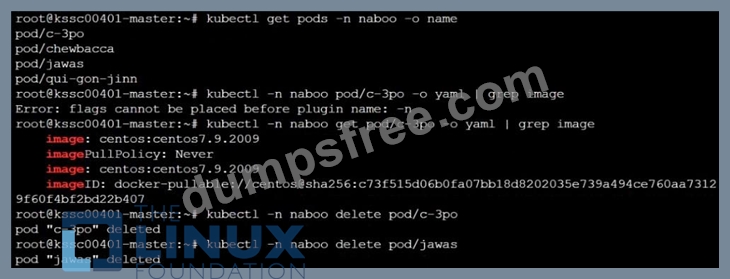
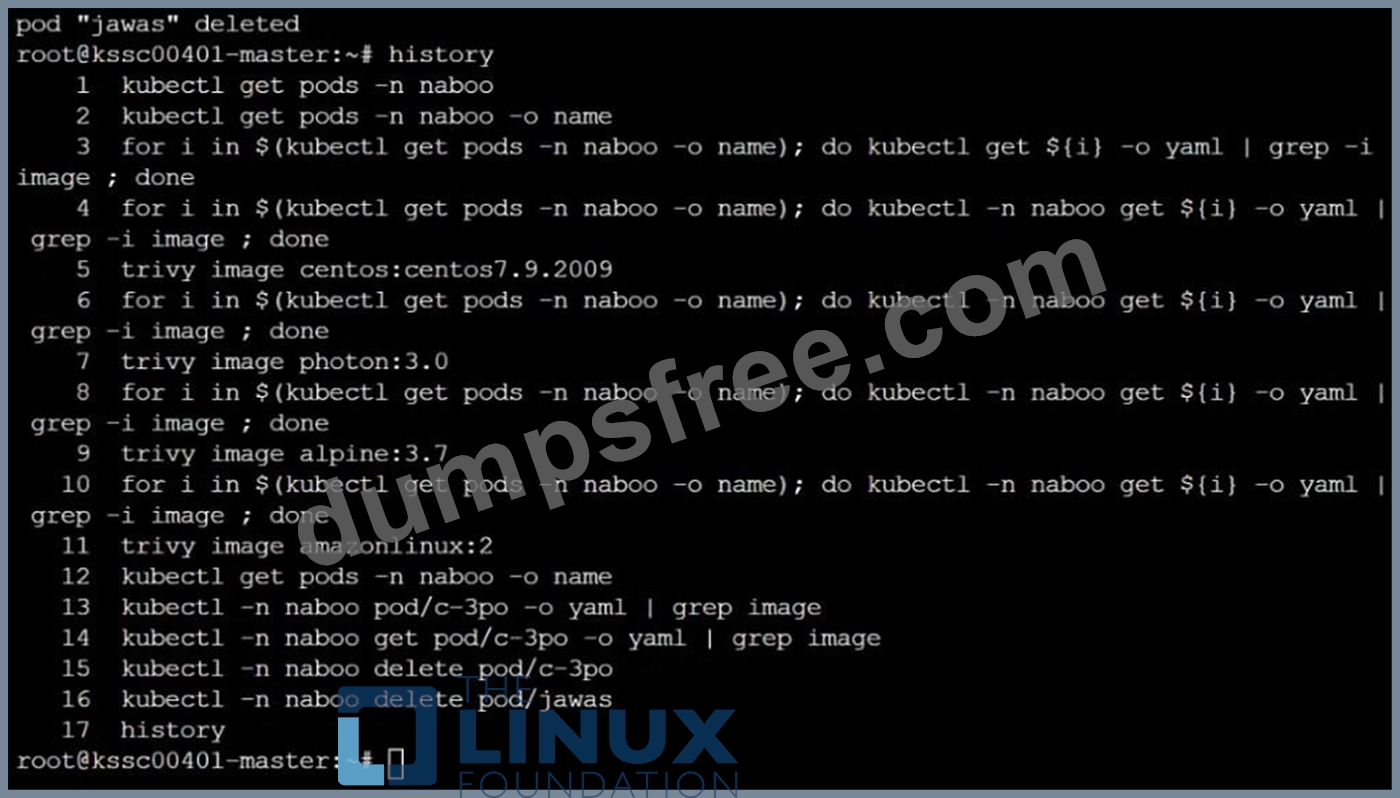
Task: Use the Trivy open-source container scanner to detect images with severe vulnerabilities used by Pods in the namespace nato.
Look for images with High or Critical severity vulnerabilities and delete the Pods that use those images. Trivy is pre-installed on the cluster's master node. Use cluster's master node to use Trivy.
Answer:
Explanation: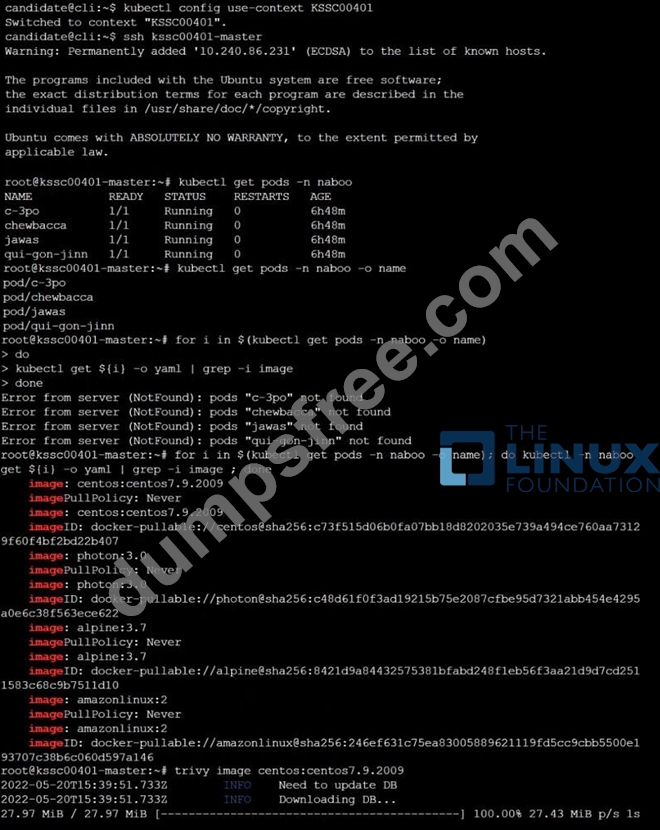
NEW QUESTION # 26
SIMULATION
a. Retrieve the content of the existing secret named default-token-xxxxx in the testing namespace.
Store the value of the token in the token.txt
b. Create a new secret named test-db-secret in the DB namespace with the following content:
username: mysql
password: password@123
Create the Pod name test-db-pod of image nginx in the namespace db that can access test-db-secret via a volume at path /etc/mysql-credentials
Answer:
Explanation:
To add a Kubernetes cluster to your project, group, or instance:
Navigate to your:
Project's Operations > Kubernetes page, for a project-level cluster.
Group's Kubernetes page, for a group-level cluster.
Admin Area > Kubernetes page, for an instance-level cluster.
Click Add Kubernetes cluster.
Click the Add existing cluster tab and fill in the details:
Kubernetes cluster name (required) - The name you wish to give the cluster.
Environment scope (required) - The associated environment to this cluster.
API URL (required) - It's the URL that GitLab uses to access the Kubernetes API. Kubernetes exposes several APIs, we want the "base" URL that is common to all of them. For example, https://kubernetes.example.com rather than https://kubernetes.example.com/api/v1.
Get the API URL by running this command:
kubectl cluster-info | grep -E 'Kubernetes master|Kubernetes control plane' | awk '/http/ {print $NF}' CA certificate (required) - A valid Kubernetes certificate is needed to authenticate to the cluster. We use the certificate created by default.
List the secrets with kubectl get secrets, and one should be named similar to default-token-xxxxx. Copy that token name for use below.
Get the certificate by running this command:
kubectl get secret <secret name> -o jsonpath="{['data']['ca\.crt']}"
NEW QUESTION # 27
Using the runtime detection tool Falco, Analyse the container behavior for at least 20 seconds, using filters that detect newly spawning and executing processes in a single container of Nginx.
store the incident file art /opt/falco-incident.txt, containing the detected incidents. one per line, in the format
[timestamp],[uid],[processName]
- A. Send us your
- B. Send us your feedback on it.
Answer: B
NEW QUESTION # 28
On the Cluster worker node, enforce the prepared AppArmor profile
#include <tunables/global>
profile nginx-deny flags=(attach_disconnected) {
#include <abstractions/base>
file,
# Deny all file writes.
deny /** w,
}
EOF'
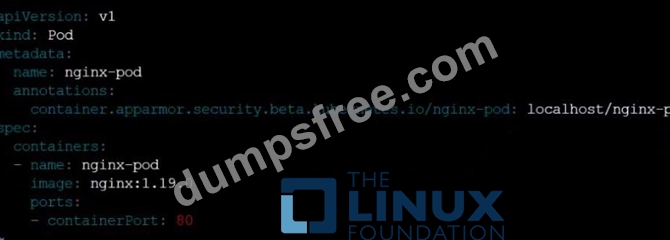
Edit the prepared manifest file to include the AppArmor profile.
apiVersion: v1
kind: Pod
metadata:
name: apparmor-pod
spec:
containers:
- name: apparmor-pod
image: nginx
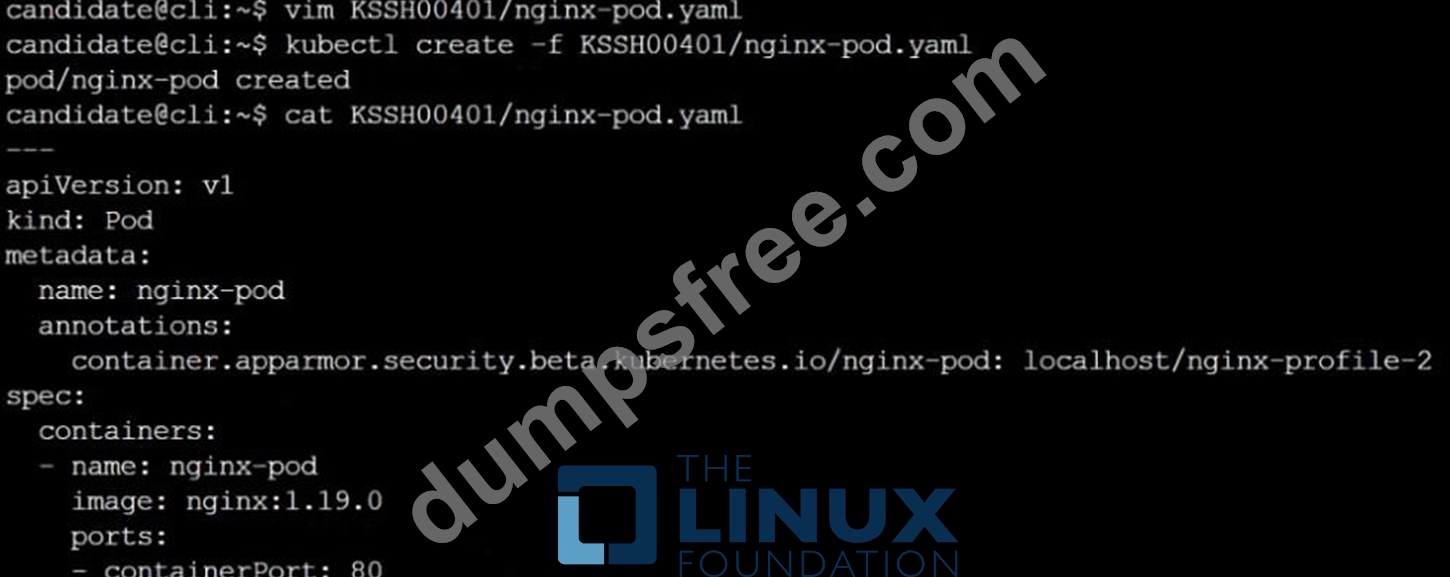
Finally, apply the manifests files and create the Pod specified on it.
Verify: Try to make a file inside the directory which is restricted.
Answer:
Explanation: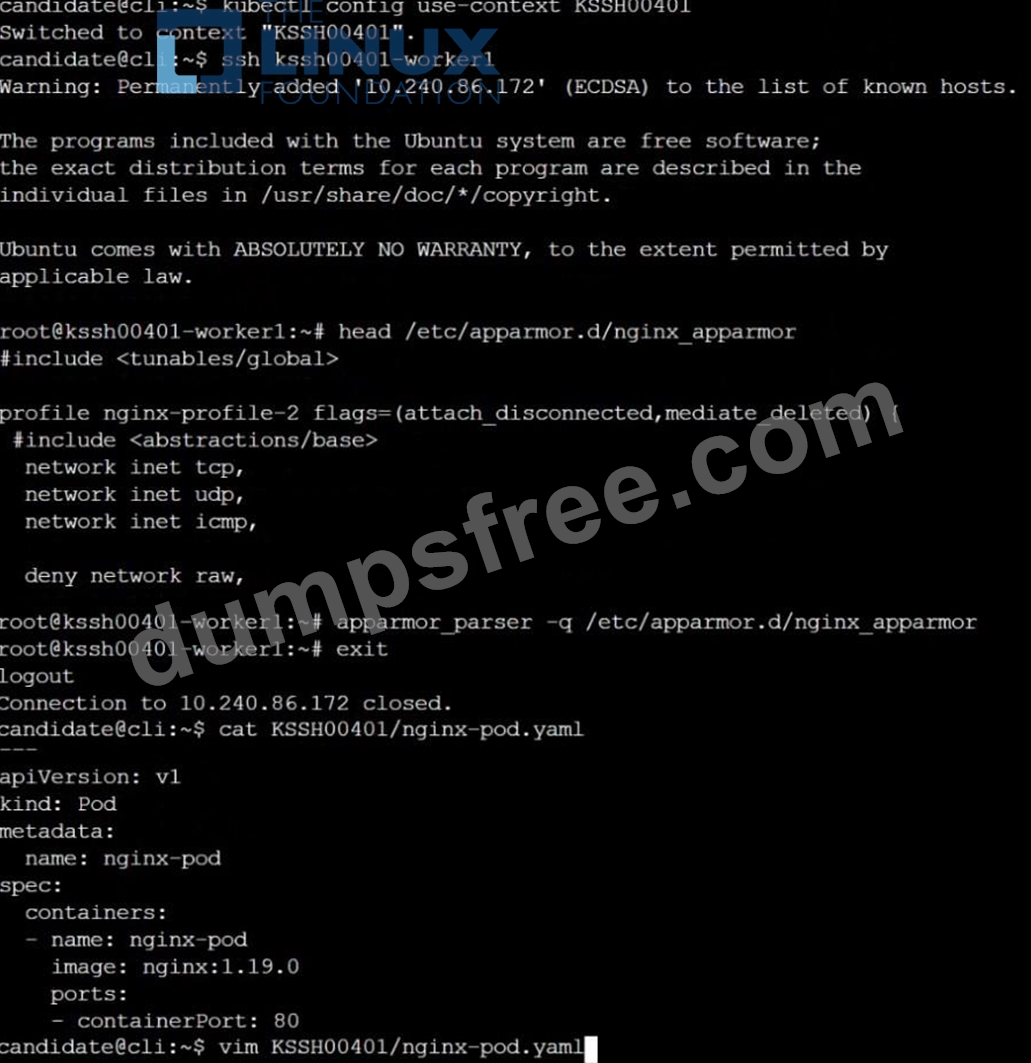
NEW QUESTION # 29
SIMULATION
Given an existing Pod named nginx-pod running in the namespace test-system, fetch the service-account-name used and put the content in /candidate/KSC00124.txt Create a new Role named dev-test-role in the namespace test-system, which can perform update operations, on resources of type namespaces.
Create a new RoleBinding named dev-test-role-binding, which binds the newly created Role to the Pod's ServiceAccount ( found in the Nginx pod running in namespace test-system).
- A. Sendusyourfeedbackonit
Answer: A
NEW QUESTION # 30
SIMULATION
Create a network policy named allow-np, that allows pod in the namespace staging to connect to port 80 of other pods in the same namespace.
Ensure that Network Policy:-
1. Does not allow access to pod not listening on port 80.
2. Does not allow access from Pods, not in namespace staging.
Answer:
Explanation:
apiVersion: networking.k8s.io/v1
kind: NetworkPolicy
metadata:
name: network-policy
spec:
podSelector: {} #selects all the pods in the namespace deployed
policyTypes:
- Ingress
ingress:
- ports: #in input traffic allowed only through 80 port only
- protocol: TCP
port: 80
NEW QUESTION # 31
SIMULATION
Enable audit logs in the cluster, To Do so, enable the log backend, and ensure that
1. logs are stored at /var/log/kubernetes/kubernetes-logs.txt.
2. Log files are retained for 5 days.
3. at maximum, a number of 10 old audit logs files are retained.
Edit and extend the basic policy to log:
1. Cronjobs changes at RequestResponse
2. Log the request body of deployments changes in the namespace kube-system.
3. Log all other resources in core and extensions at the Request level.
4. Don't log watch requests by the "system:kube-proxy" on endpoints or
- A. Send us the Feedback on it.
Answer: A
NEW QUESTION # 32
Task
Create a NetworkPolicy named pod-access to restrict access to Pod users-service running in namespace dev-team.
Only allow the following Pods to connect to Pod users-service:
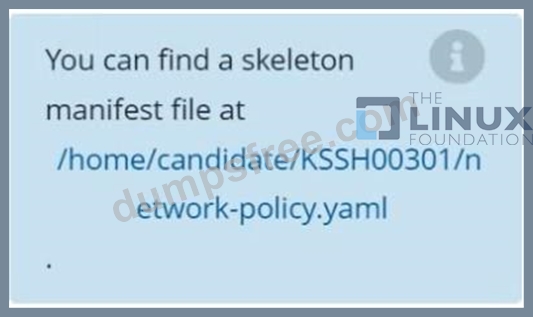
Answer:
Explanation: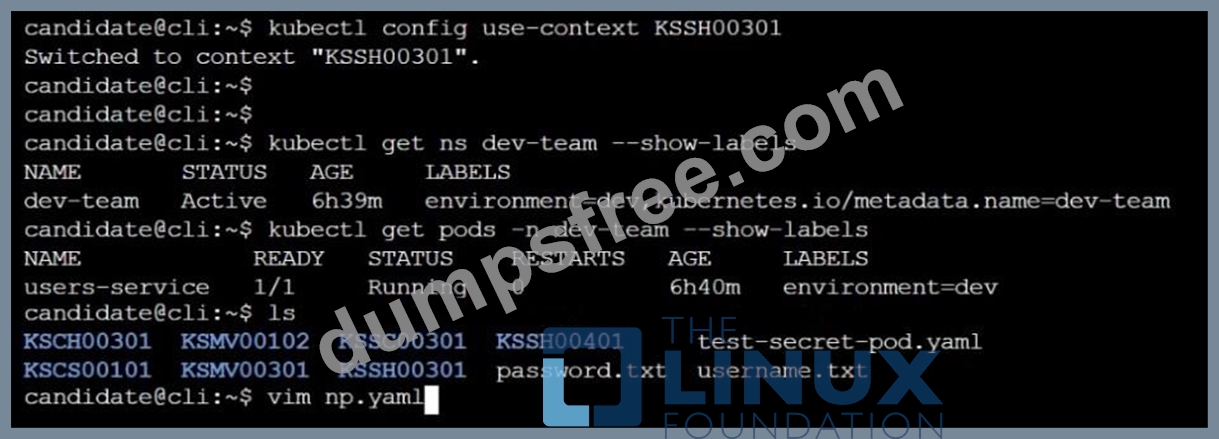
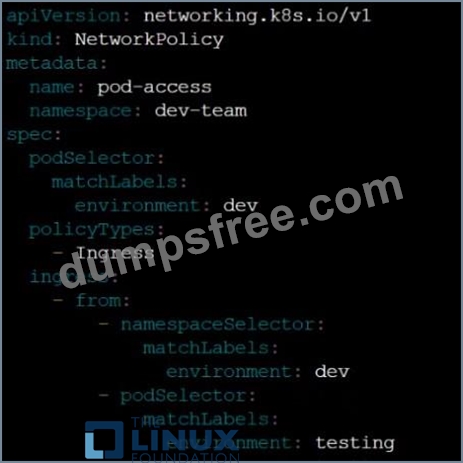
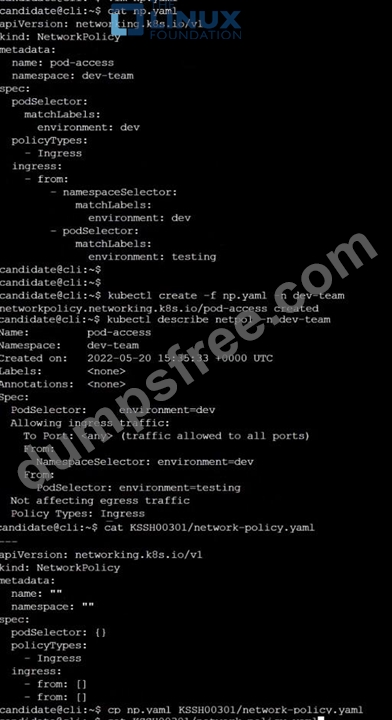
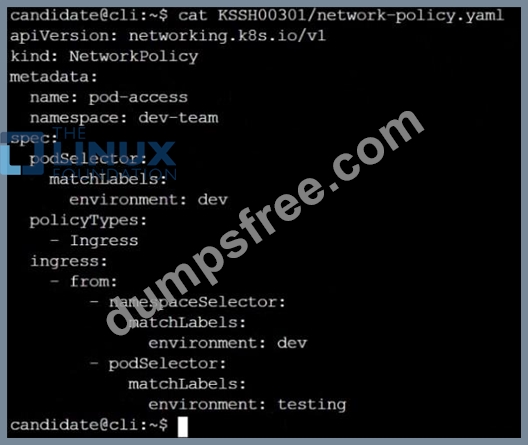
NEW QUESTION # 33
On the Cluster worker node, enforce the prepared AppArmor profile
#include <tunables/global>
profile docker-nginx flags=(attach_disconnected,mediate_deleted) {
#include <abstractions/base>
network inet tcp,
network inet udp,
network inet icmp,
deny network raw,
deny network packet,
file,
umount,
deny /bin/** wl,
deny /boot/** wl,
deny /dev/** wl,
deny /etc/** wl,
deny /home/** wl,
deny /lib/** wl,
deny /lib64/** wl,
deny /media/** wl,
deny /mnt/** wl,
deny /opt/** wl,
deny /proc/** wl,
deny /root/** wl,
deny /sbin/** wl,
deny /srv/** wl,
deny /tmp/** wl,
deny /sys/** wl,
deny /usr/** wl,
audit /** w,
/var/run/nginx.pid w,
/usr/sbin/nginx ix,
deny /bin/dash mrwklx,
deny /bin/sh mrwklx,
deny /usr/bin/top mrwklx,
capability chown,
capability dac_override,
capability setuid,
capability setgid,
capability net_bind_service,
deny @{PROC}/* w, # deny write for all files directly in /proc (not in a subdir)
# deny write to files not in /proc/<number>/** or /proc/sys/**
deny @{PROC}/{[^1-9],[^1-9][^0-9],[^1-9s][^0-9y][^0-9s],[^1-9][^0-9][^0-9][^0-9]*}/** w, deny @{PROC}/sys/[^k]** w, # deny /proc/sys except /proc/sys/k* (effectively /proc/sys/kernel) deny @{PROC}/sys/kernel/{?,??,[^s][^h][^m]**} w, # deny everything except shm* in /proc/sys/kernel/ deny @{PROC}/sysrq-trigger rwklx, deny @{PROC}/mem rwklx, deny @{PROC}/kmem rwklx, deny @{PROC}/kcore rwklx, deny mount, deny /sys/[^f]*/** wklx, deny /sys/f[^s]*/** wklx, deny /sys/fs/[^c]*/** wklx, deny /sys/fs/c[^g]*/** wklx, deny /sys/fs/cg[^r]*/** wklx, deny /sys/firmware/** rwklx, deny /sys/kernel/security/** rwklx,
}
Edit the prepared manifest file to include the AppArmor profile.
apiVersion: v1
kind: Pod
metadata:
name: apparmor-pod
spec:
containers:
- name: apparmor-pod
image: nginx
Finally, apply the manifests files and create the Pod specified on it.
Verify: Try to use command ping, top, sh
- A. Send us your Feedback on this.
Answer: A
NEW QUESTION # 34
SIMULATION
Fix all issues via configuration and restart the affected components to ensure the new setting takes effect.
Fix all of the following violations that were found against the API server:- a. Ensure that the RotateKubeletServerCertificate argument is set to true.
b. Ensure that the admission control plugin PodSecurityPolicy is set.
c. Ensure that the --kubelet-certificate-authority argument is set as appropriate.
Fix all of the following violations that were found against the Kubelet:- a. Ensure the --anonymous-auth argument is set to false.
b. Ensure that the --authorization-mode argument is set to Webhook.
Fix all of the following violations that were found against the ETCD:-
a. Ensure that the --auto-tls argument is not set to true
b. Ensure that the --peer-auto-tls argument is not set to true
Hint: Take the use of Tool Kube-Bench
Answer:
Explanation:
Fix all of the following violations that were found against the API server:- a. Ensure that the RotateKubeletServerCertificate argument is set to true.
apiVersion: v1
kind: Pod
metadata:
creationTimestamp: null
labels:
component: kubelet
tier: control-plane
name: kubelet
namespace: kube-system
spec:
containers:
- command:
- kube-controller-manager
+ - --feature-gates=RotateKubeletServerCertificate=true
image: gcr.io/google_containers/kubelet-amd64:v1.6.0
livenessProbe:
failureThreshold: 8
httpGet:
host: 127.0.0.1
path: /healthz
port: 6443
scheme: HTTPS
initialDelaySeconds: 15
timeoutSeconds: 15
name: kubelet
resources:
requests:
cpu: 250m
volumeMounts:
- mountPath: /etc/kubernetes/
name: k8s
readOnly: true
- mountPath: /etc/ssl/certs
name: certs
- mountPath: /etc/pki
name: pki
hostNetwork: true
volumes:
- hostPath:
path: /etc/kubernetes
name: k8s
- hostPath:
path: /etc/ssl/certs
name: certs
- hostPath:
path: /etc/pki
name: pki
b. Ensure that the admission control plugin PodSecurityPolicy is set.
audit: "/bin/ps -ef | grep $apiserverbin | grep -v grep"
tests:
test_items:
- flag: "--enable-admission-plugins"
compare:
op: has
value: "PodSecurityPolicy"
set: true
remediation: |
Follow the documentation and create Pod Security Policy objects as per your environment.
Then, edit the API server pod specification file $apiserverconf
on the master node and set the --enable-admission-plugins parameter to a value that includes PodSecurityPolicy :
--enable-admission-plugins=...,PodSecurityPolicy,...
Then restart the API Server.
scored: true
c. Ensure that the --kubelet-certificate-authority argument is set as appropriate.
audit: "/bin/ps -ef | grep $apiserverbin | grep -v grep"
tests:
test_items:
- flag: "--kubelet-certificate-authority"
set: true
remediation: |
Follow the Kubernetes documentation and setup the TLS connection between the apiserver and kubelets. Then, edit the API server pod specification file
$apiserverconf on the master node and set the --kubelet-certificate-authority parameter to the path to the cert file for the certificate authority.
--kubelet-certificate-authority=<ca-string>
scored: true
Fix all of the following violations that were found against the ETCD:-
a. Ensure that the --auto-tls argument is not set to true
Edit the etcd pod specification file $etcdconf on the master node and either remove the --auto-tls parameter or set it to false. --auto-tls=false b. Ensure that the --peer-auto-tls argument is not set to true Edit the etcd pod specification file $etcdconf on the master node and either remove the --peer-auto-tls parameter or set it to false. --peer-auto-tls=false
NEW QUESTION # 35
Context
A default-deny NetworkPolicy avoids to accidentally expose a Pod in a namespace that doesn't have any other NetworkPolicy defined.
Task
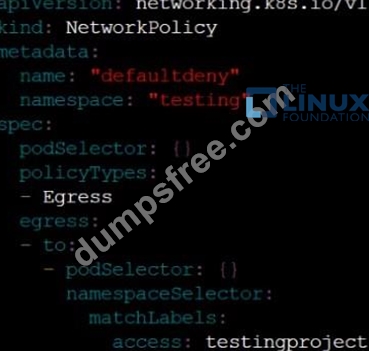
Create a new default-deny NetworkPolicy named defaultdeny in the namespace testing for all traffic of type Egress.
The new NetworkPolicy must deny all Egress traffic in the namespace testing.
Apply the newly created default-deny NetworkPolicy to all Pods running in namespace testing.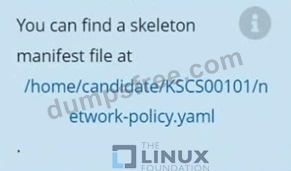
Answer:
Explanation: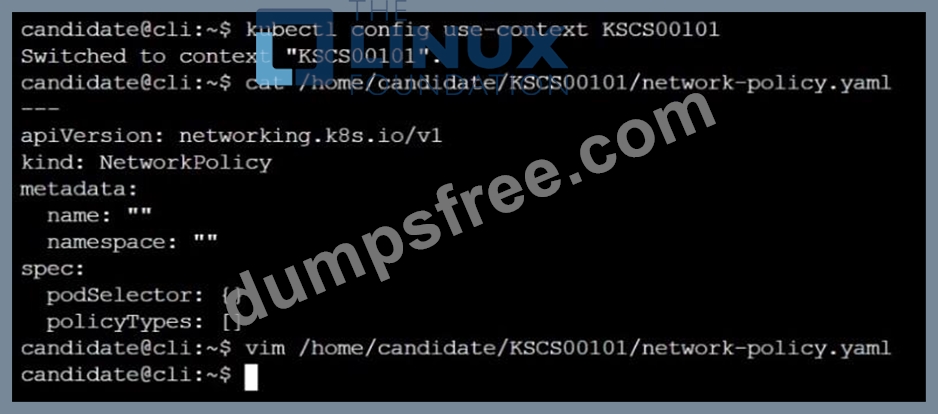
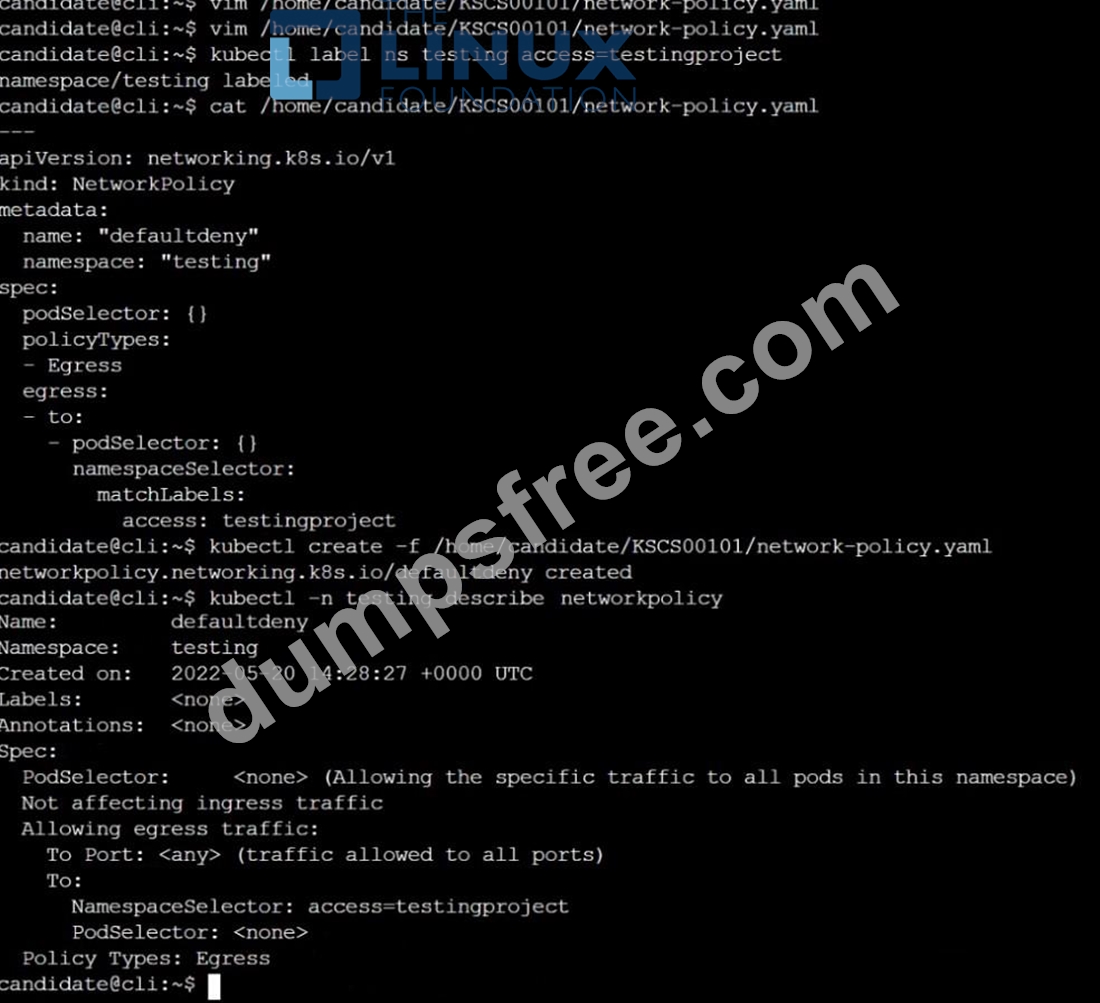
NEW QUESTION # 36
SIMULATION
A container image scanner is set up on the cluster.
Given an incomplete configuration in the directory
/etc/kubernetes/confcontrol and a functional container image scanner with HTTPS endpoint https://test-server.local.8081/image_policy
1. Enable the admission plugin.
2. Validate the control configuration and change it to implicit deny.
Finally, test the configuration by deploying the pod having the image tag as latest.
- A. Send us the Feedback on it.
Answer: A
NEW QUESTION # 37
Given an existing Pod named test-web-pod running in the namespace test-system Edit the existing Role bound to the Pod's Service Account named sa-backend to only allow performing get operations on endpoints.
Create a new Role named test-system-role-2 in the namespace test-system, which can perform patch operations, on resources of type statefulsets.
- A. Create a new RoleBinding named test-system-role-2-binding binding the newly created Role to the Pod's ServiceAccount sa-backend.
Answer: A
NEW QUESTION # 38
Context
A PodSecurityPolicy shall prevent the creation of privileged Pods in a specific namespace.
Task
Create a new PodSecurityPolicy named prevent-psp-policy,which prevents the creation of privileged Pods.
Create a new ClusterRole named restrict-access-role, which uses the newly created PodSecurityPolicy prevent-psp-policy.
Create a new ServiceAccount named psp-restrict-sa in the existing namespace staging.
Finally, create a new ClusterRoleBinding named restrict-access-bind, which binds the newly created ClusterRole restrict-access-role to the newly created ServiceAccount psp-restrict-sa.
Answer:
Explanation:


NEW QUESTION # 39
Enable audit logs in the cluster, To Do so, enable the log backend, and ensure that
1. logs are stored at /var/log/kubernetes/kubernetes-logs.txt.
2. Log files are retained for 5 days.
3. at maximum, a number of 10 old audit logs files are retained.
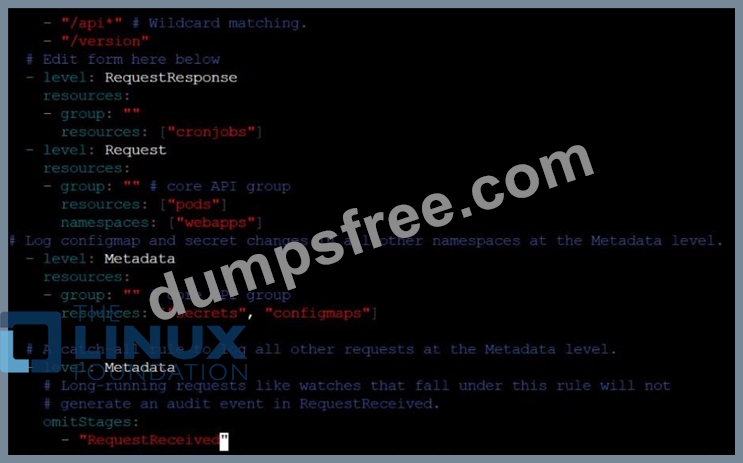
Edit and extend the basic policy to log:
1. Cronjobs changes at RequestResponse
2. Log the request body of deployments changes in the namespace kube-system.
3. Log all other resources in core and extensions at the Request level.
4. Don't log watch requests by the "system:kube-proxy" on endpoints or
Answer:
Explanation: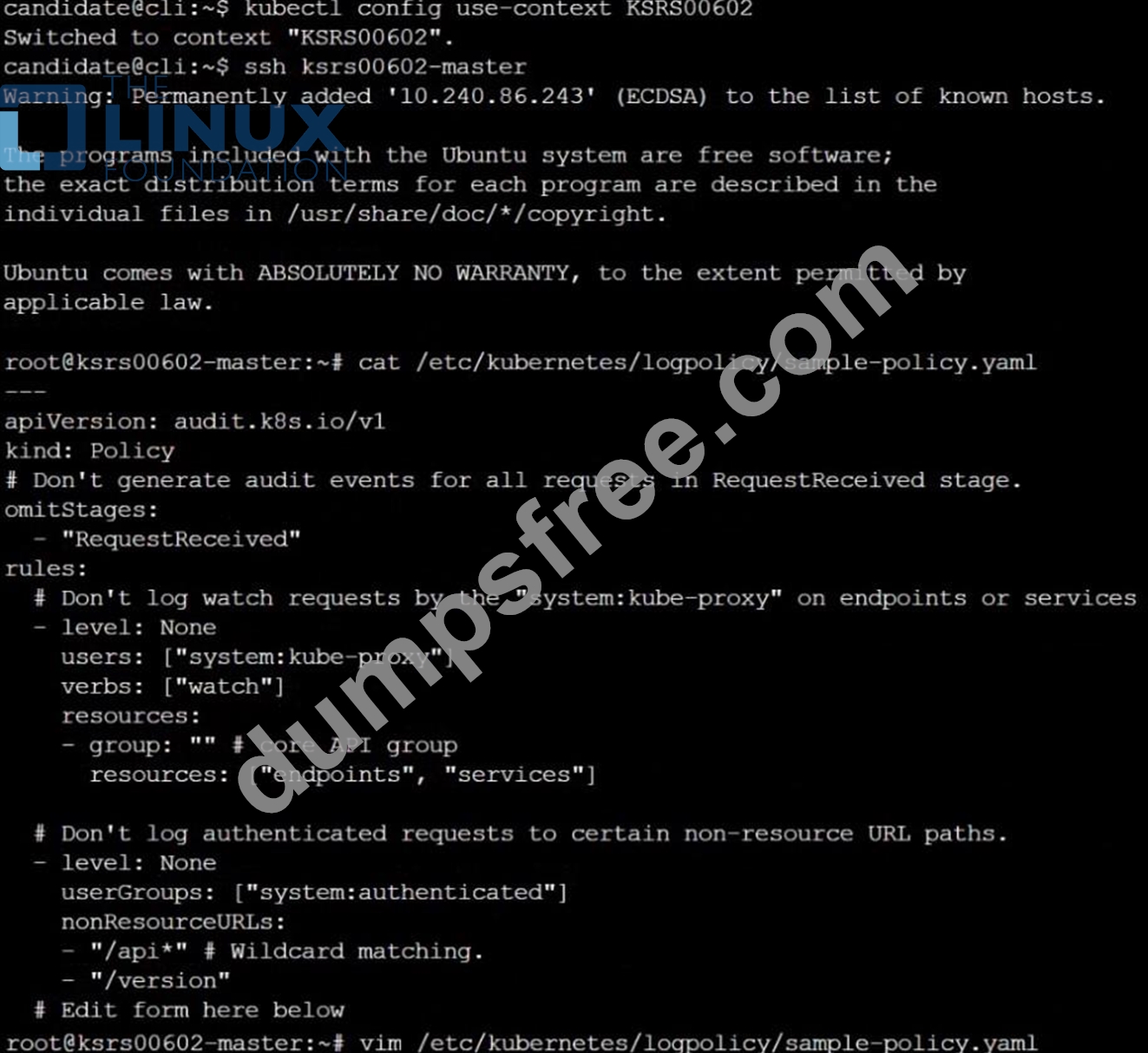
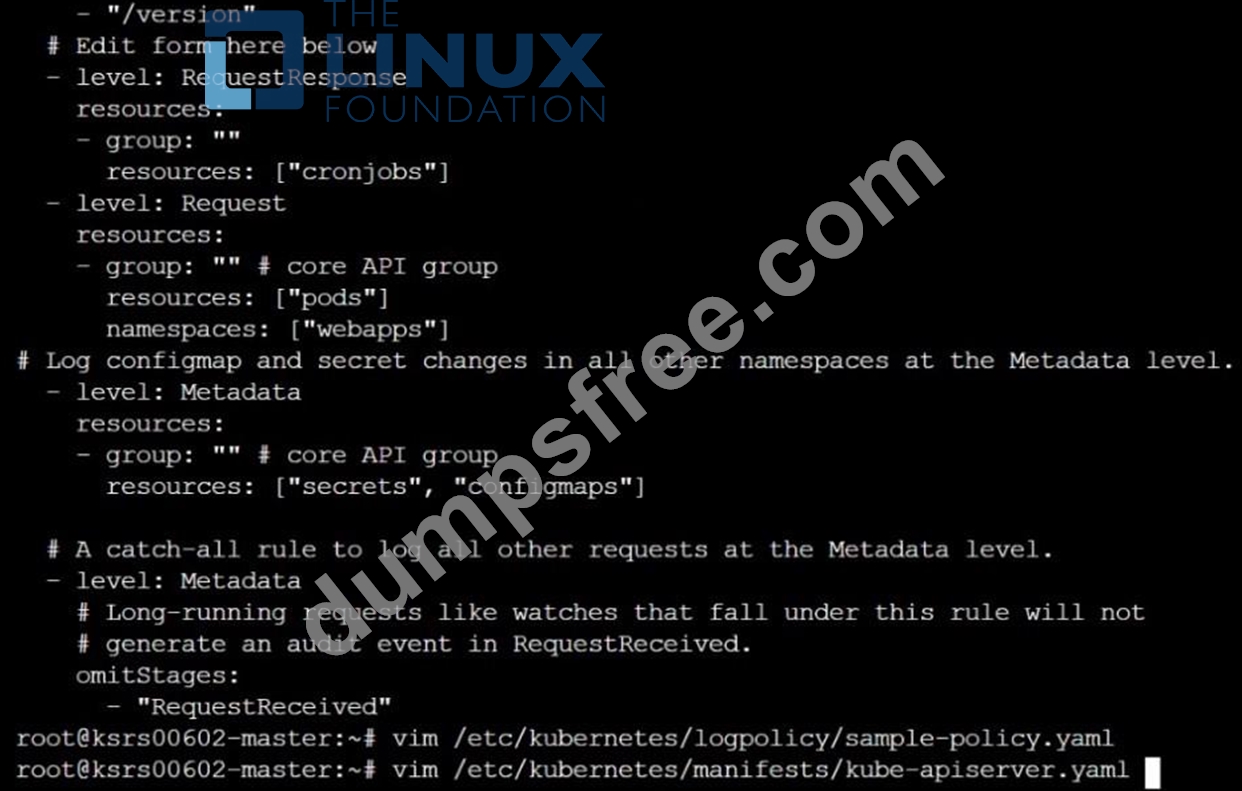
NEW QUESTION # 40
You must complete this task on the following cluster/nodes:
Cluster: apparmor
Master node: master
Worker node: worker1
You can switch the cluster/configuration context using the following command:
[desk@cli] $ kubectl config use-context apparmor
Given: AppArmor is enabled on the worker1 node.
Task:
On the worker1 node,
1. Enforce the prepared AppArmor profile located at: /etc/apparmor.d/nginx
2. Edit the prepared manifest file located at /home/cert_masters/nginx.yaml to apply the apparmor profile
3. Create the Pod using this manifest
Answer:
Explanation:
[desk@cli] $ ssh worker1
[worker1@cli] $apparmor_parser -q /etc/apparmor.d/nginx
[worker1@cli] $aa-status | grep nginx
nginx-profile-1
[worker1@cli] $ logout
[desk@cli] $vim nginx-deploy.yaml
Add these lines under metadata:
annotations: # Add this line
container.apparmor.security.beta.kubernetes.io/<container-name>: localhost/nginx-profile-1
[desk@cli] $kubectl apply -f nginx-deploy.yaml
Explanation
[desk@cli] $ ssh worker1
[worker1@cli] $apparmor_parser -q /etc/apparmor.d/nginx
[worker1@cli] $aa-status | grep nginx
nginx-profile-1
[worker1@cli] $ logout
[desk@cli] $vim nginx-deploy.yaml
[desk@cli] $kubectl apply -f nginx-deploy.yaml pod/nginx-deploy created Reference: https://kubernetes.io/docs/tutorials/clusters/apparmor/ pod/nginx-deploy created
[desk@cli] $kubectl apply -f nginx-deploy.yaml pod/nginx-deploy created Reference: https://kubernetes.io/docs/tutorials/clusters/apparmor/
NEW QUESTION # 41
......
CKS Dumps With 100% Verified Q&As - Pass Guarantee or Full Refund: https://www.dumpsfree.com/CKS-valid-exam.html
Pass Linux Foundation CKS Exam With Practice Test Questions Dumps Bundle: https://drive.google.com/open?id=1iz3VvgStwG6p482SC4QgmzcySQ0UKgyz